 A Proud Canadian Company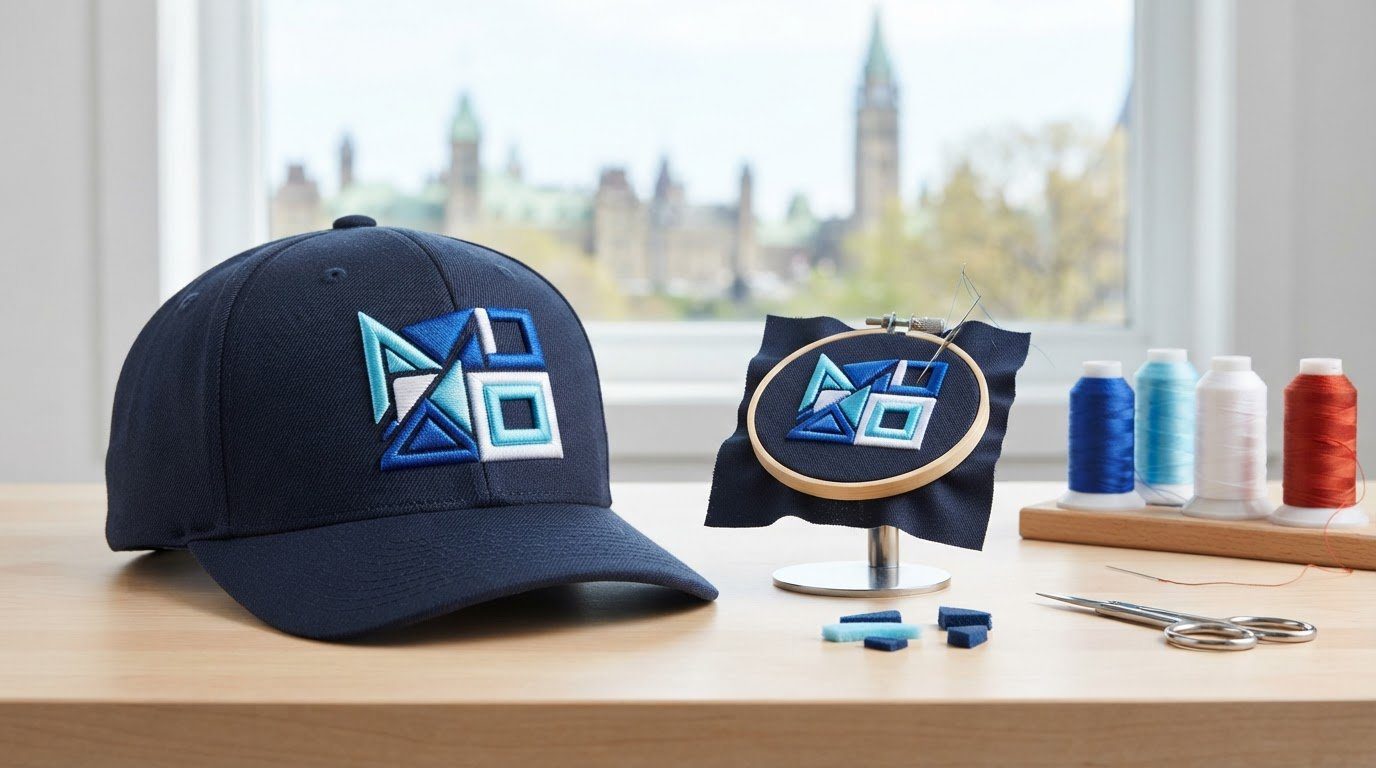
A raised hat logo depends on the stitch plan as much as the thread. 3D puff embroidery on hats places foam beneath satin stitches, lifting the design about 1/8 inch above the cap for a dimensional finish.
It’s natural to focus on foam or thread first, but clean results depend on planning the entire design. Fine details and small text can lose clarity when raised, while larger letters and shapes give the foam room to create a crisp, noticeable effect.
This guide explains how puff embroidery differs from flat stitching and how to choose thread and foam for the look you want. You’ll also learn how to separate raised areas from flat details, judge whether a design suits a hat, and prepare artwork so every element has a clear role. A thoughtful plan helps raised shapes stand out while keeping the finished design balanced and readable.
Key Takeaways
- Choose bold text and simple shapes for raised stitching; fine details may need to be simplified to stay clear.
- Plan raised and flat-stitched areas separately so small details remain crisp while larger elements create dimension.
- Match the foam and thread to the design’s stitch coverage and the finish you want, rather than treating material choice as an afterthought.
- Consider structured hats for added support, and assess whether the chosen panel gives the design a clean, balanced placement.
- Custom Hats from Printwell Canada can carry a planned embroidered design from concept to a finished, wearable piece.
What is 3D puff embroidery?
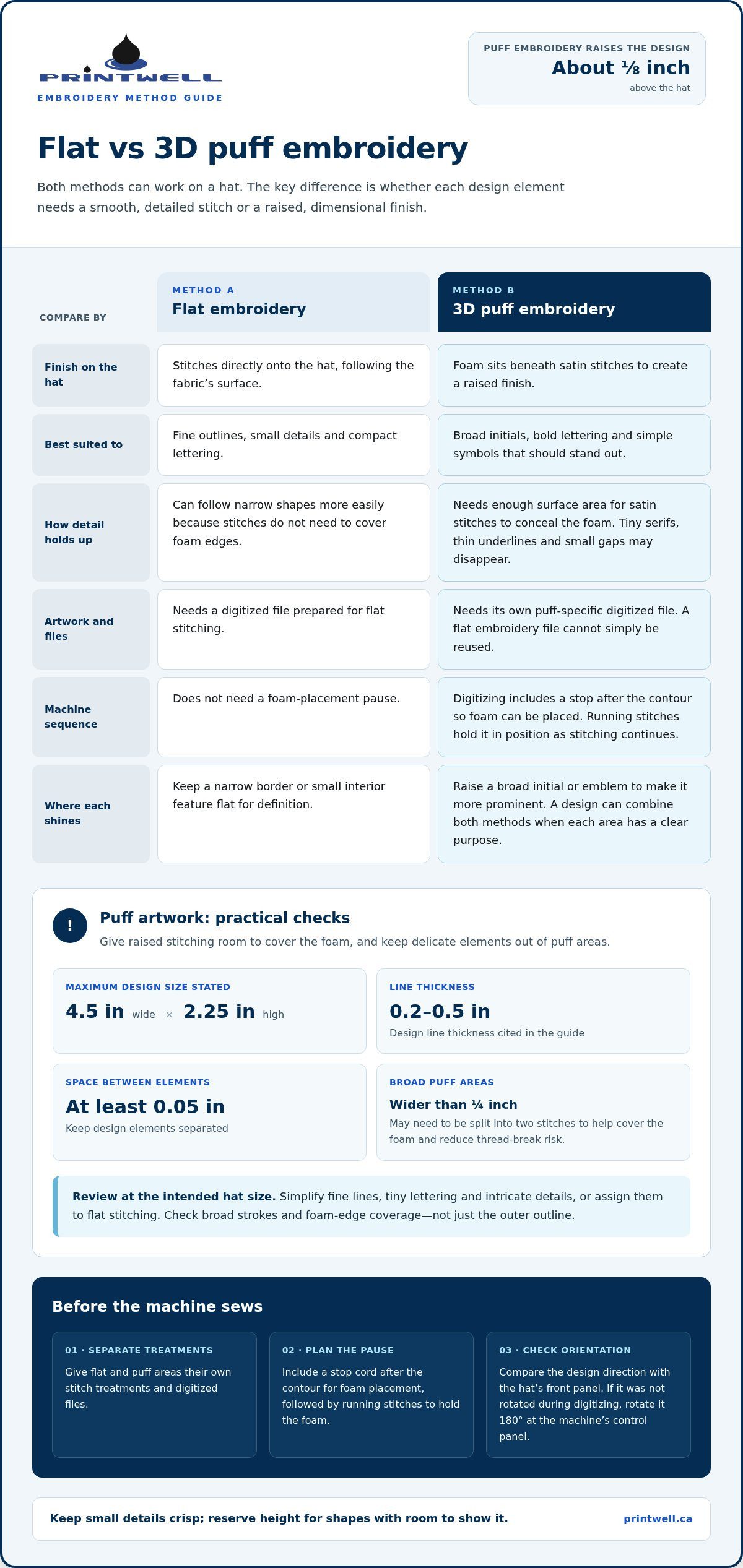
3D puff embroidery on hats places foam beneath satin stitches, raising selected parts of a design. The finished stitching typically rises about 1/8 inch above the hat. Bold lettering and uncomplicated shapes suit this technique because their broad surfaces cover the foam.
Common defects include exposed foam, gaps along edges, broken threads, and misaligned stitching. Help prevent them with adequate coverage, suitable stitch widths, and secure cap positioning, then remove excess foam after stitching.
To care for a puff-embroidered hat, gently spot-clean it with a damp cloth and mild soap. Avoid scrubbing the raised stitches, which can disturb the thread or foam, and let the hat air-dry.
- Choose bold shapes and legible text. Broad letters and simple logos give satin stitches room to cover the foam. Fine lines, tiny lettering, and intricate details may not sew cleanly or remain readable, so simplify them or reserve them for flat stitching. For text, aim for a thickness between 0.15 and 0.5 inches. Revised puff lettering is recommended to be between 1/8 and 1/4 inch wide.
- Keep the design within practical dimensions. A stated maximum design width is 4.5 inches, with a maximum height of 2.25 inches. These limits help keep artwork suited to a hat’s available embroidery area. Design line thickness should be 0.2-0.5 inches (5-12.5 mm), with at least 0.05 inches (1.27 mm) of spacing between design elements.
- Review wide areas for stitch coverage. For puff embroidery, designs wider than 1/4 inch may need to be split into two stitches. This helps prevent foam from coming through and reduces the risk of thread breaks. Check broad strokes in letters and symbols, not just the overall outline; coverage depends on how the stitches meet at each edge.
- Digitize specifically for puff. Digitizing converts artwork into instructions for the embroidery machine. Artwork digitized for flat embroidery must be digitized again for puff, and each embroidery style needs its own file. During cap digitizing, include a stop cord after the contour so the machine pauses for foam placement. Running stitches hold the foam in place as stitching continues.
- Set the design’s orientation before sewing. Check the artwork’s direction against the hat’s front panel before embroidery begins. If the design wasn’t rotated during digitizing, rotate it 180 degrees at the machine’s control panel to embroider it in the correct position. This step helps prevent an otherwise well-digitized logo from appearing upside down.
How puff embroidery differs from flat embroidery
- Choose the effect before preparing the artwork. Flat embroidery stitches directly onto the hat, following the fabric’s surface. Puff embroidery adds foam beneath satin stitches for a raised finish. Choose flat stitching for fine outlines, small details, and compact lettering. Choose puff for broad initials, bold lettering, or a simple symbol that should stand out. A design can combine both methods when each area has a clear purpose.
- Compare how each method handles detail. Flat stitches can follow narrow shapes more easily because they don’t need to cover foam edges. Puff needs enough surface area for satin stitches to conceal the foam. A tiny serif, thin underline, or small gap may disappear in a raised section. Review the artwork at its intended hat size, assigning delicate elements to flat stitching and substantial shapes to puff.
- Plan for different digitizing files. Digitizing turns artwork into machine instructions, including stitch direction and sequence. A flat design file cannot simply be reused for puff, each embroidery style needs its own digitized file. Plan flat and raised areas as separate stitch treatments. This lets the machine sew fine details without foam, then stitch larger shapes over foam where you want the raised effect.
- Account for the foam placement pause. Puff embroidery needs a machine stop after the contour so foam can be placed before satin stitches cover it. Digitizing should include a stop cord at that point, plus running stitches to hold the foam in position. Flat embroidery doesn’t require this step. Review the stitch sequence in a sewout, especially where flat details meet raised shapes.
- Match stitch coverage to the raised area. Satin stitches must cover foam edges cleanly, while flat stitching can use other stitch types for outlines and small details. For cap puff embroidery, review satin stitch density at the foam end faces to help ensure the foam is covered cleanly. Designs wider than 1/4 inch may need two stitches to help prevent foam showing through and thread breakage. Use this distinction when reviewing broad strokes, not only the outer silhouette.
- Choose the method by the job each element performs. A flat outline can define a small interior feature, while puff makes a larger letter or emblem more prominent. For example, keep a narrow border flat and raise a broad initial. Avoid fine text inside a puff area, where foam and dense coverage can crowd the shapes. This division adds contrast without forcing every detail into the same stitch treatment.
Separating flat and puff embroidery print areas
- Mark which elements need height. Start with the design’s purpose, then assign foam only to elements that should stand out. A team name or broad initial can be raised, while a small mascot eye or narrow outline stays flat. This keeps the most visible shapes dimensional without forcing every feature into the same treatment. Clearly label each area on the artwork before digitizing.
- Keep fine details in flat-stitch zones. Small lettering, thin borders, and compact interior marks need room to remain distinct. For example, a detailed animal emblem can use flat stitches for its eye, mouth, and fur lines, with puff reserved for its larger silhouette. Foam beneath fine marks can crowd details or leave edges exposed. Separate these areas in the design plan so each has an intentional stitch treatment.
- Give each raised shape a clear boundary. Identify where foam-backed satin stitches meet flat stitching. A flat outline beside a puff letter can define its edge, but overlapping stitch paths can make the join bulky. Draw boundaries that follow the artwork’s natural contours, such as a block letter’s edge or the outside of a simple badge. Keep narrow gaps and delicate divisions out of the puff zone.
- Map the stitch sequence around foam placement. The embroidery machine needs to pause after sewing the puff area’s contour so foam can be positioned. Digitize running stitches to hold the foam in place during embroidery. Use the pause point to distinguish the raised area from nearby flat details. For a cap logo, define the foam placement area and its boundary before assigning the remaining details to flat stitching.
- Review the design at its final scale. A separation that looks obvious on a large computer image may vanish on a hat. Check the artwork at its intended size and inspect each meeting point between flat and raised sections. For example, a narrow gap inside a letter may close once stitches cover the foam. Simplify the division or move the detail into a flat-stitched area before preparing machine instructions.
- Test the complete combination. Review a sewout, not just the digital preview, to see how thread, foam, and fabric meet. Check for visible foam, crowded edges, and flat details obscured by raised stitching. If a small feature disappears beside a puff shape, revise its placement or stitch treatment. Then update the design file so the embroidery machine follows the revised boundaries consistently across the finished pieces.
Thread choice for 3D puff embroidery
- Decide how the thread colour should read. Choose a shade that contrasts clearly with the hat or coordinates with it for a quieter finish. For a two-colour logo, use the most visible shade on the largest raised shape. Check the choice against the actual hat colour, not just a screen preview. Thread colour affects the stitched design’s appearance, while foam creates its raised profile.
- Match thread colour to each design area. If the artwork combines flat details and puff lettering, plan their thread colours together. A contrasting flat outline can define a puff shape; matching shades make the edge less distinct. For a simple crest, use one colour for the raised initials and another for its flat border. Previewing the combination helps keep the areas visually separate.
- Consider coverage at the foam edges. Satin stitches cover the foam and form the visible surface of a raised area. Choose thread to support a consistent, fully covered appearance across the shape. Inspect broad letters and curved sections in a sewout, paying particular attention to their edges. If foam shows through, adjust the stitch plan or coverage; changing colour alone won’t cover an exposed edge.
- Keep small details distinct from bold thread areas. Fine marks can become harder to read beside dense, raised lettering. In a cap logo, for example, keep a small icon detail flat and give the large initial its own puff area. Choose thread colours that help the elements remain visually clear. Review the complete design at its intended size, since a pairing that works enlarged may look crowded on the hat.
- Assess the thread during a sewout. A test stitch lets you judge the actual colour, coverage, and interaction with foam. Compare the sample with the hat fabric under the lighting where it will usually be viewed. Check satin edges and flat-to-puff joins, then revise the thread colour or stitch plan if details blend together. This is more useful than choosing thread from a digital mock-up alone.
- Protect the thread during finishing. Remove excess foam after embroidery, taking care around the finished stitches. Small foam remnants may be melted with hair-dryer heat, but keep the dryer at a safe distance when polyester yarn is used because polyester melts easily. Avoid directing heat at the thread. Careful cleanup removes foam that could show around the design while helping preserve the stitched surface.
Which hat fabrics, panels, and designs are suitable for 3D puff embroidery?
- Start with a structured hat. Structured hats are preferred because they provide added support for raised stitching. Before choosing a design, inspect the front panel for firmness, seams, and usable embroidery space. A stable panel gives puff embroidery a better foundation than a soft, easily distorted surface. Fabric texture and flexibility also affect how smoothly stitches sit, so assess the actual hat rather than judging by colour or shape alone.
- Choose a placement that suits the panel. Puff embroidery can go on the left front panel, side, or back. The front offers a direct view for a bold logo; a side or back can suit a smaller emblem. On a curved cap, check how the design sits across the panel before digitizing. Keep seams from interrupting a raised shape, as they can break its outline or make it harder to read.
- Match the artwork to the available area. A stated maximum design width is 4.5 inches, and the maximum height is 2.25 inches. Treat these as upper limits, then consider the panel’s curve and placement. A broad block initial may fit the front more naturally than a long line of text. Keep the silhouette simple enough to retain its shape when placed on the chosen panel.
- Use bold shapes for the raised treatment. Large letters, solid symbols, and simple outlines give puff stitching room to create a visible effect. A narrow script word or detailed crest may not suit an entirely raised treatment. For example, raise a team logo’s large central letter while keeping small interior details flat. This balance preserves the emblem’s character without crowding the foam-backed area.
- Review the cap as a finished object. Position the hat as it will be worn, then check how the panel curves around the design. A logo centred on flat artwork may appear off-centre on a curved front. Consider the side and back panels too, especially if the front already carries a large design. Confirm the placement and artwork together before digitizing the final embroidery file.
Planning coordinated apparel alongside a hat? Explore embroidered hoodies for another way to carry a team or business design.
Printwell Canada: Custom T-Shirts
Printwell Canada offers Custom Hats for teams, businesses, and personal designs that need a considered embroidered finish. After choosing the hat panel, artwork, and thread colours, a custom hat brings the plan together. Custom T-Shirts and Embroidered Hoodies can carry a coordinated design across apparel, while DTF Stickers and Films offer another format for artwork.
Share your design and the look you’re aiming for when you’re ready to move from planning to a finished piece. For a coordinated apparel project or a custom hat, visit Printwell Canada online or contact the team.
Turn your design into a wearable statement
Treat the hat as part of a larger visual identity. A raised logo can carry through to team apparel, staff clothing, or promotional materials, creating a consistent look wherever people see it. Consider where the design will be worn, which details deserve attention, and how the hat’s colours support your message.
Printwell Canada offers Custom T-Shirts, Embroidered Hoodies, and DTF Stickers and Films to help carry artwork across different formats. If your concept is ready, or you’d like to discuss how it could work on a hat, contact Printwell Canada about your hat embroidery. Bring your artwork and a sense of the look you’re aiming for. A clear starting point makes it easier to shape 3D puff embroidery on hats into a distinctive piece that feels considered and genuinely yours.
Frequently Asked Questions
How does it work?
A machine stitches over foam to create a raised embroidered area. First, the artwork is digitised into machine instructions, including stitch order and pauses. The machine sews the outline, pauses for foam placement, then covers the foam with stitches. Afterward, excess foam is removed. For example, a cap logo can feature a raised initial and a separate flat detail, giving each part a distinct visual role.
What is 3D puff embroidery on hats and how does it work?
It’s a cap-decoration method that places foam beneath selected stitched areas to give them visible height. The foam sits under the thread rather than acting as a finished patch. This makes the technique useful for a bold emblem or initials that should stand out from the hat. The raised effect works best with clear shapes; a fine slogan may be better suited to flat stitching.
What design requirements and file formats are needed for 3D puff embroidery?
Use clear artwork with uncomplicated shapes and provide a high-quality source file. Printwell Canada accepts formats including AI, EPS, SVG, PDF, PSD, TIFF, JPG, PNG, and DST. A DST file contains embroidery machine instructions, while artwork formats need digitising before stitching. For example, a clean vector logo gives the digitiser defined edges to work with. Keep a separate version of the artwork for each embroidery treatment.
What are the recommended stitch settings, foam thickness, and digitising techniques for 3D puff embroidery?
For cap embroidery, set satin stitch density at the foam end faces to 0.2 mm. Digitising should include a machine stop after the contour, then running stitches to secure the foam during sewing. Foam thickness depends on the desired raised profile and how well the cap supports it. A sewout helps assess coverage and edges before applying the same setup to finished hats.
How does 3D puff embroidery compare with flat embroidery, patches, and screen printing on hats?
Puff embroidery adds stitched height, while flat embroidery follows the fabric surface. A patch is a separate decorated piece attached to the hat, giving it a distinct edge. Puff screen printing uses ink to create a raised effect; embroidery uses thread. For a cap logo with bold initials and fine details, combining puff and flat embroidery can add depth to large shapes while keeping small marks crisp.
Where can I order custom 3D puff embroidered hats in Canada, and what should I check before choosing a supplier?
In Ottawa, Printwell Canada offers Custom Hats as a local option for custom headwear. Before preparing an order, decide which logo areas should be raised, where the design will sit, and which details should remain flat. Share clear artwork and the intended hat style so the plan suits the panel shape. You can order online or visit Printwell Canada’s showroom at St. Laurent Shopping Centre.
How much does 3D puff hat embroidery cost in Canada?
Pricing for 3D puff hat embroidery in Canada typically depends on order volume, hat style, and the complexity of your logo. Because digitising and setup fees may apply to smaller runs, larger orders generally offer a better per-piece rate. Contact Printwell Canada directly for a tailored quote based on your specific artwork and headwear selection.
What is the minimum order quantity and typical turnaround time for custom 3D puff hats in Canada?
The minimum order is 6 pieces.