 A Proud Canadian Company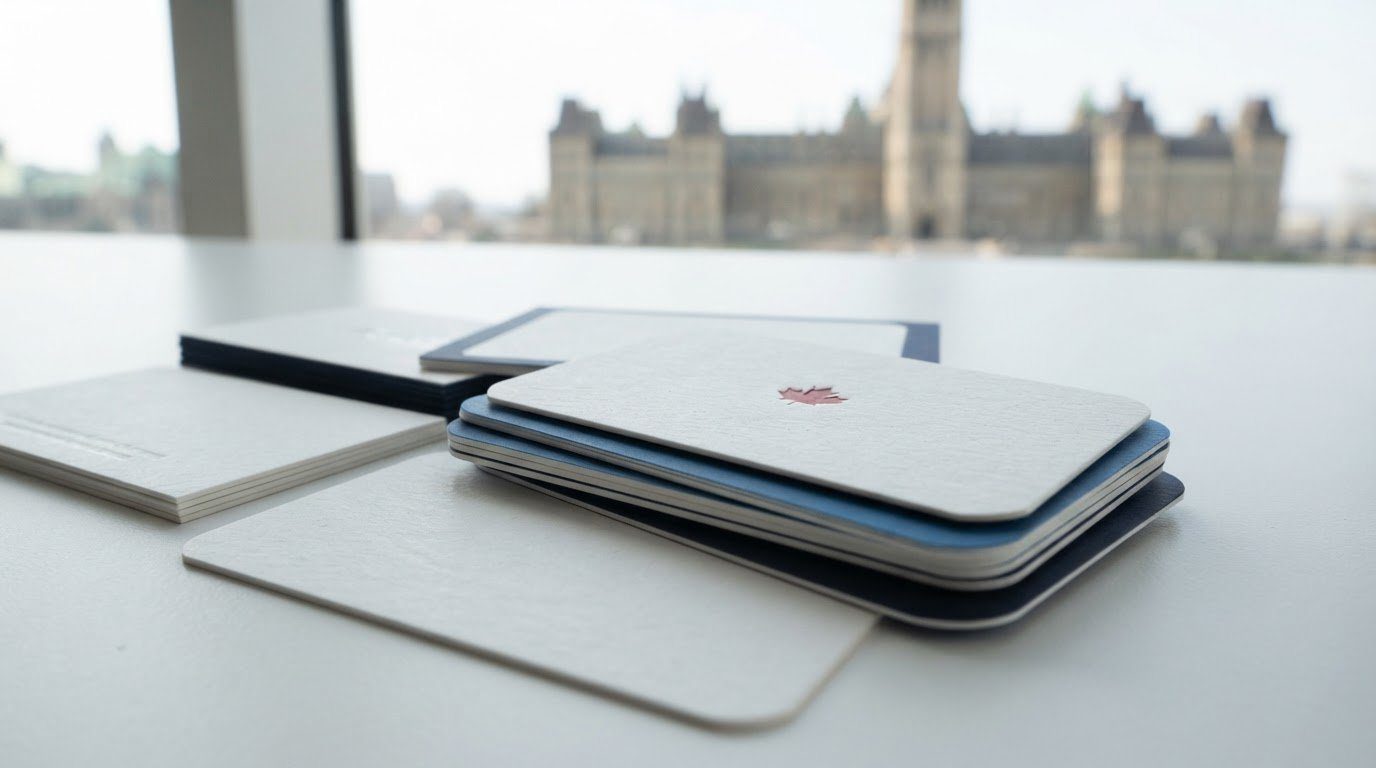
A clean business card doesn’t have to feel plain. Minimalist business card ideas give essential details room to breathe, while one deliberate choice, such as a distinctive font, adds character. The result feels clear, polished and personal.
For a professional look without a crowded layout, start with the arrangement rather than adding decoration. Choose a template that gives your name and contact details a clear order, then consider a tactile finish to make the design feel considered.
Learn why minimalist cards make a strong impression and how to choose an orientation, corner style, template and finish. You’ll also see how colour, typography and spacing can work together to create a simple design that still feels like yours.
Key Takeaways
- Keep both sides visually consistent so the card feels like one clear, considered design.
- Choose a horizontal or vertical layout based on how you want information to flow, then decide whether square or rounded corners suit the look.
- Use a template to organize your details and create visual balance without adding unnecessary elements.
- Consider finishes such as gloss, letterpress or embossing to add texture and a tactile detail.
- Choose a clear, restrained type style and use distinctive lettering thoughtfully to give the card personality.
1. Why choose a minimalist design for your business cards?
A minimalist card puts your name and contact details front and centre. It removes decoration that competes for attention, while a distinctive font or carefully placed colour can still show personality. For example, a photographer might feature their name and phone number on the front, with a small camera icon on the back.
Treat both sides as parts of one design, not separate advertisements. Use the same type style, colour palette and spacing on each side. Put your name and role on the front, then add contact details or a short service description on the reverse. This structure helps the reader recognize a consistent identity.
Minimalist business card ideas can start with a single detail, such as a bold name, fine border or block of colour. Black and white is a classic combination, but a restrained accent colour can make a logo stand out. Choose one main feature and leave open space around it so the card feels organized, not empty.
Printing costs depend on choices such as paper, quantity and finishing, so there is no single price for every minimalist business card in Canada. A straightforward design and a textured finish may also require different production choices.
Black and white creates a crisp, classic look, while one accent colour adds focus. A centred layout feels balanced; left-aligned details create a clear reading path. For instance, place a logo above your name, then align the contact information beneath it.
Include the details people need to recognize you and get in touch, such as your name, role, business name, phone number, email and website. A consultant might put their name and role on the front, with the business name and contact details on the back.
Before printing, review the front and back together. Check spelling, phone digits, email characters, logo placement and contrast against the background. Keep important text away from the edges, and review a print proof to catch layout or colour issues before production.
A QR code can link a printed card to a portfolio, booking page or digital contact details. Include one only if the destination is useful, and leave clear space around it so it remains easy to scan.
Common mistakes include shrinking text until it is hard to read, using too many fonts and filling every open area. A decorative script paired with several colours can distract from the details. Choose a readable type style, keep contact information prominent and let one design element carry the personality.
A minimalist business card can use a distinctive font while keeping the rest of the design clean. Let the typeface provide character, and keep other elements restrained so the overall impression remains uncluttered. If the lettering is expressive, avoid competing decorative treatments. If it is understated, a carefully chosen font can still make the card feel individual. The aim is a clear, coherent design that shows personality without crowding essential details.
2. Card orientation and corner options
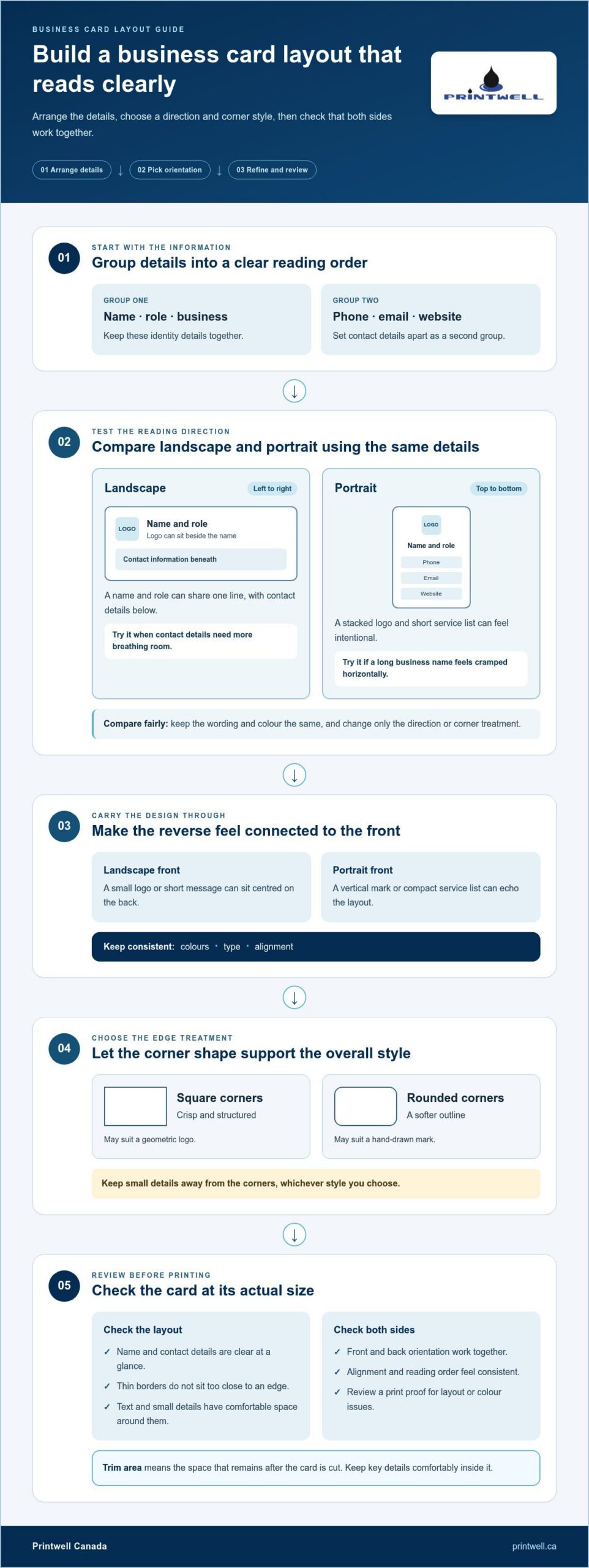
Start with the direction your details naturally follow. A horizontal, or landscape, card gives a name and role room on one line, with contact information beneath. It suits a logo placed beside the name. A vertical, or portrait, card creates a top-to-bottom reading path, making a stacked logo and short service list feel intentional.
Test both directions with the same information before choosing. Put your name, role and business name together, then arrange your phone, email and website as a second group. If a long business name feels cramped horizontally, try a vertical layout. If the contact details become a tall column, landscape may give them more breathing room.
Orientation also affects the reverse side. With a horizontal front, a small logo or short message can sit centred on the back. A vertical front can pair with a simple vertical mark or compact service list. Connect the reverse to the front through matching colours, type and alignment. For example, align the back’s logo with the name on the front.
Corner shape adds a subtle design choice. Square corners support a crisp, structured look, while rounded corners soften the outline. Choose a style that suits the rest of the design: a geometric logo may work well with square corners, while a hand-drawn mark may suit a softer edge. Either way, keep small details away from the corners.
Review the card at its actual size, not just on a large screen. A thin border can look uneven if it sits too close to an edge, and text near a rounded corner may feel crowded. Keep key details comfortably inside the trim area, the space that remains after the card is cut. Check that the name and contact details are clear at a glance.
Before settling on an orientation or corner style, compare two simple mock-ups. Keep the wording and colour the same, changing only the direction or corner treatment. This makes it easier to judge each choice without mixing it up with changes to colour or typography. For example, compare a landscape version with square corners and a portrait version with rounded corners.
Once the layout feels balanced, prepare matching front and back files and review their orientation together. A thoughtful layout carries through to business card printing, where a clear design can be brought into print.
The Dr. Walter Wolston business card features the number 46 in its bottom-left corner. That detail is a useful example to keep in mind when reviewing how information sits near an edge: a corner placement should not crowd the name or contact details. When comparing layouts, check whether a small element has enough space around it and remains easy to distinguish from the trim area. Keep its position purposeful rather than adding decorative marks without a role. A final review of the front and reverse can confirm that corner spacing, alignment and reading order feel consistent with the chosen orientation.
3. Minimalist business card templates
A template provides a starting structure, not a finished identity. Choose one that gives your name, role and contact details clear places. For example, a name-led template makes a consultant’s name the main feature, while a logo-led template gives a visual mark more space. Start with the structure that highlights what people should notice first.
Compare a few layout types before adding colour or decoration. A left-aligned template creates a direct reading path, while a centred layout feels more formal. A two-sided template can put your name and role on the front, with contact details on the back. If your small business has a long name, try a layout that gives it a line of its own.
Look closely at the space between elements. A good template separates the business name from the phone number, email and website so each detail is easy to find. For instance, a thin line can divide a logo from contact information without adding another image. If the template feels crowded before you add all your details, choose a simpler structure.
Adapt the template to your brand instead of keeping every sample element. Replace placeholder text with your real name and role, then remove icons or decorative shapes that serve no purpose. A baker could keep a small wordmark and business name but remove extra flourishes. This makes the design personal while preserving the template’s useful spacing.
Carry the same design choices through both sides. If the front uses a dark background and light lettering, the reverse can use the same colours with a smaller logo or contact details. Matching type and consistent alignment help the two sides feel connected. Avoid adding a new font or unrelated colour just to fill open space.
Before choosing a template, place your actual details, remove unnecessary decoration, then review the card at its intended size. Check that the name stands out and every contact detail is legible. If a logo, long title or web address disrupts the layout, try another template instead of shrinking everything. The right fit supports your information without making it feel squeezed.
4. Tactile finishes such as gloss and letterpress
A tactile finish gives a simple business card a detail people can see or feel. Spot Gloss adds shine to selected areas, such as a logo or business name, rather than covering the whole design. Letterpress presses a design into the card, creating a noticeable impression. Embossing raises a design from the surface and adds texture. Each finish can bring character to a restrained layout.
Choose a finish that highlights the detail you want people to notice. Spot Gloss, for example, can draw attention to a small symbol against a matte-looking background. Letterpress can give a short name or line of text more dimension. Embossing can emphasize a logo without adding another colour. These treatments work best when they support one clear feature rather than compete with several design elements.
Consider the card’s overall balance before selecting a finish. If the front already has a large logo, adding texture to every detail may make it feel busy. Instead, apply a tactile effect to one small area and keep the surrounding text simple. A florist might highlight a leaf symbol, while a bookkeeper could use a subtle pressed name. The finish should strengthen the design’s focal point.
Plan the placement early. Mark the exact area for Spot Gloss, letterpress or embossing in the design file, and make sure it does not overlap important contact details. A finish across a phone number may make it harder to read. Keep the name and email clear, and reserve a separate area for the tactile feature. This also helps the front and reverse feel coordinated.
Consider colour and contrast alongside texture. A black card with a glossy black logo creates a restrained effect through the change in shine, while a light card with a pressed name emphasizes depth through shadow. Both examples rely on one visual change rather than extra decoration. If you’re choosing between finishes, compare how each treats the same logo or wordmark, a brand name designed as a distinctive text-based logo.
When a sample is available, review it under different lighting and run a finger over the finished detail. A glossy area may catch the light differently as the card moves, while a pressed or raised mark can be felt directly. This hands-on check helps you judge whether the finish suits your intended look and whether small lettering remains easy to read.
For a clean result, keep the tactile detail limited, readable and consistent with the rest of the design. One finish can create a premium feel without filling open space with extra graphics. Choose the effect that best expresses your brand, then check its placement beside the name and contact information before approving the final layout.
5. Which fonts work best for minimalist business cards?
A clean sans serif font is a strong starting point for minimalist business cards. Sans serif letters have no small finishing strokes at their ends, giving them a simple, modern appearance. Fonts with consistent letter height can make a name and contact details feel orderly. For example, a small design studio might use a straightforward sans serif for its name and phone number.
Choose typography based on what the card needs to communicate. A technology consultant may prefer a crisp, geometric font, while a neighbourhood bakery might choose a softer style. Make the business name easy to notice, then give the role and contact details less emphasis. This visual difference, called hierarchy, helps readers know what to look at first.
Limit the design to one or two fonts. One family can handle the whole card, with a heavier style for the name and a regular style for the email address. If you combine fonts, choose styles with clear contrast, such as a clean sans serif for details and a restrained serif for the name. Serif fonts have small strokes at the ends of letters. Avoid pairing ornate lettering with another decorative style.
Test the font with the actual wording, not sample text. A long business name, email address or professional title may look different from a short placeholder. Check letters that can be confused at small sizes, such as lowercase “l” and uppercase “I.” Review punctuation too, including periods in web addresses and the “@” symbol in email details. Clear letterforms matter more than novelty.
Colour and background affect how typography reads. Black lettering on a light background is a familiar, high-contrast option. White type on a dark field can also look clean, but thin strokes may be harder to see. Review the name and contact details together, especially if the card includes a logo. Avoid placing fine lettering over a busy pattern or a low-contrast colour.
Before approving the design, view a print proof at the card’s intended size. A font that looks elegant on a large screen may feel cramped beside a long title or contact line. Check both sides for consistent letter styles, spacing and emphasis. Make sure no essential detail relies on an unusually thin stroke or ornate letter shape.
Good typography gives a card personality without crowding it. Choose a readable font, use weight and spacing with purpose, and let one type choice do the expressive work. If your layout is ready, order custom business cards with the design you’ve prepared.
Printwell Canada: Custom T-Shirts
Printwell Canada can help extend a consistent visual identity beyond your business cards. If your brand appears at events, on a team or in customer promotions, custom T-shirts, custom hats and embroidered hoodies offer practical ways to display it. Direct-to-Film (DTF) stickers and films can also carry your chosen graphic onto suitable projects.
These printed and embroidered items complement a thoughtfully organized brand presence, whether you’re preparing for a market, outfitting staff or creating promotional pieces. Choose items that suit how you’ll use them, then keep your logo and core colours consistent across materials.
To explore Printwell Canada’s custom printing options, visit printwell.ca.
Make your next impression feel unmistakably yours
Think of your card as a small introduction that can open the door to a larger brand experience. The best minimalist business card ideas leave room for your business to grow rather than tying its identity to a passing trend. Choose a design you’ll feel comfortable handing to a new customer, neighbour or future collaborator.
As your business develops, the same visual identity can carry through to other materials. Printwell Canada offers custom T-shirts, DTF stickers and films, and embroidered hoodies to help you bring a familiar look beyond your card. Each item can play a different role, from introducing your business to creating a consistent presence at events.
Ready to put your card design into print? Contact Printwell Canada about your cards and take the next step with confidence.
Frequently Asked Questions
Why choose a minimalist design for your business cards?
A minimalist design makes important details easier to spot and gives your brand a clear, deliberate feel. It can also make a card more versatile. For example, an independent accountant could use a simple name treatment that feels right at a client meeting or community event. Keep only the elements that identify the business or guide someone to the next step.
What are popular minimalist business card design ideas and examples?
Popular minimalist business card ideas include a small monogram, a single-colour logo or a fine line drawing related to the business. A home renovator might use a simple roof outline, while a music teacher could feature a small note beside their name. For a useful extra, reserve the reverse for a short booking prompt or appointment reminder instead of adding decoration without a purpose.
Which paper stocks and finishes suit minimalist business cards?
Choose a paper stock, the paper used to make the card, based on how you want it to feel in someone’s hand. A smooth surface can keep fine lettering crisp, while a more textured surface adds character. Spot Gloss, Letterpress and embossing each create a different effect. Consider how the finish works with your logo and text so the details stay easy to recognize.