 A Proud Canadian Company
What if a low-toner warning doesn’t mean your cartridge is finished? Toner can seem to run out faster than expected, especially when every document is printed at the same quality setting. Extending the life of your printer toner is less about squeezing every last page from a cartridge and more about matching your settings and habits to the job.
It’s reasonable to worry that toner-saving options could make important prints look faint or unfinished. Draft or eco mode can work for everyday documents, while higher-quality settings remain available for work where crisp text or colour matters. Small choices, such as proofreading on screen and printing in black and white when colour isn’t needed, can also help reduce waste.
This guide covers practical printer settings, everyday habits, cartridge storage and handling, and what to do when a low-toner alert appears. You’ll learn when a setting adjustment may help, when it’s better to replace a cartridge, and when a toner refill may be an option. The aim is simple: use less toner where you can without compromising the prints that count.
Key Takeaways
- Understand why toner yield varies with page coverage, document type, print settings, and printer model.
- For extending the life of your printer toner, match print quality to the task and preview documents before sending them to the printer.
- Protect spare cartridges by keeping them sealed and following the storage guidance on the packaging and from the printer maker.
- Know why toner doesn’t dry out like ink, and avoid covering sensors or altering cartridges to bypass warnings.
- Build a simple print routine that saves toner on household drafts while preserving quality for important business documents.
What determines the life of your printer toner?
Toner is a fine powder used by laser printers to form text and images on paper. Inkjet printers work differently: they apply liquid ink through tiny nozzles. That distinction matters because advice about preventing ink from drying in printhead nozzles doesn’t automatically apply to toner. For a basic overview of the material and how laser printing uses it, see What is printer toner?
There’s no single page count that predicts how long every cartridge will last. Its useful life depends on how much toner each page requires, the type of documents you print, your print settings, and the printer model. A page of plain text generally uses less toner than one filled with photographs, dense graphics, shaded backgrounds, or large bold headings. Higher-quality settings may also use more toner, depending on the printer.
How toner cartridges differ from ink cartridges
Toner powder is transferred and fused to the paper inside a laser printer, while ink is a liquid delivered onto the page by an inkjet printer. A laser printer’s toner isn’t liquid ink that can dry out in a nozzle. If you’re caring for an inkjet instead, follow guidance for that consumable type in our printer ink refill guide. Matching the advice to the printer helps prevent unnecessary troubleshooting.
What a toner cartridge page-yield rating tells you
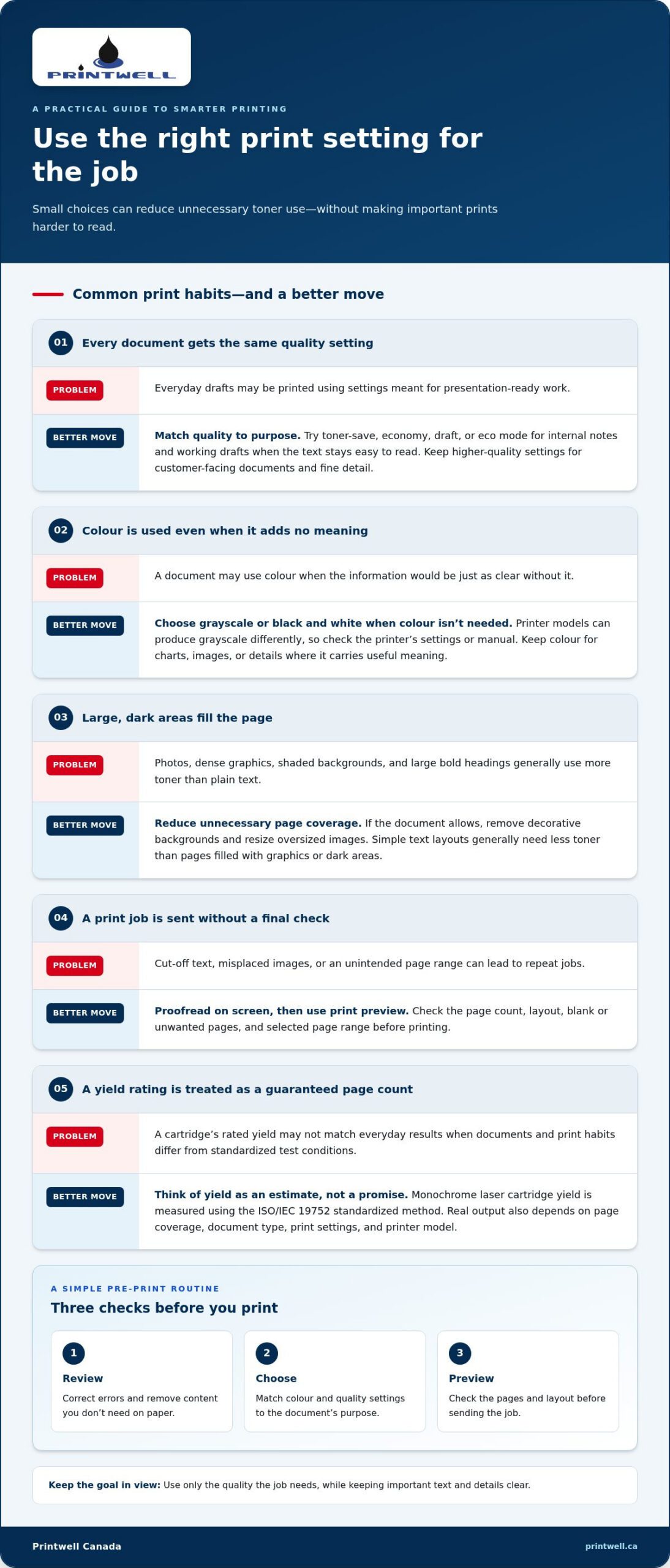
Toner yield is an estimate of how many pages a cartridge can print under standardized test conditions, not a guaranteed page count for everyday use. For monochrome laser cartridges, ISO/IEC 19752 provides a standardized method for measuring and reporting yield. A rating gives you a consistent point of comparison, but your results can differ because your documents and print habits may not match the test conditions.
Consider a household printing school forms or a business printing customer documents. Pages with sparse text may stretch a cartridge further than full-page graphics, photos, or large blocks of dark colour. Settings and printer model also affect real-world output, so two users with the same cartridge may see different results. Understanding these factors is the first step in extending the life of your printer toner: consider what each print job needs rather than expecting the yield rating to promise an exact number of pages.
How to extend the life of your printer toner with smarter print settings
A few choices before you print can make a practical difference. Review the document, select a quality setting that suits its purpose, then check the print preview. This catches unnecessary pages and helps keep everyday drafts from using settings intended for presentation-ready work.
Lower page coverage and suitable draft settings can reduce toner use. That doesn’t mean every print should be faint or stripped back. The goal is to use only the quality the job needs while keeping important text and details clear.
When toner-save mode and grayscale make sense
Look for options such as toner-save, economy, draft, or eco mode in your printer settings. Names and effects vary by model, so consult the printer’s instructions and check a sample before using the setting for a larger job. These modes can suit internal notes and working drafts when the text remains easy to read. Keep higher-quality settings for customer-facing documents or materials where fine detail and presentation matter.
For documents that don’t need colour, choose grayscale or black-and-white printing. Colour printers may use several toner cartridges, but how a particular model produces grayscale can differ. Review its settings or manual rather than assuming grayscale always uses only the black cartridge. Preserve colour for charts, images, or other content where it carries useful meaning.
Reduce unnecessary coverage before printing
Proofread on screen first, then use print preview to check the page count, layout, and any blank or unwanted pages. A quick review can prevent repeat jobs caused by cut-off text, misplaced images, or an accidentally selected page range. If the document allows, remove decorative backgrounds and resize oversized images. Large, dark areas can require more toner than a simple text layout.
- Review: Correct errors and remove content you don’t need on paper.
- Choose: Match colour and quality settings to the document’s purpose.
- Preview: Check the pages and layout before sending the job.
For business printing, apply the same checks to each job: confirm the page range, use colour only where it adds information, and reserve presentation settings for documents that need them. These small steps are a straightforward part of extending the life of your printer toner. When a cartridge is empty, Printwell Canada offers toner refills in Ottawa. Learn more at Printwell Canada.
Toner cartridge care: handling, storage, and routine printer habits
Careful handling can help keep a cartridge in good condition, but model-specific instructions should lead. Use the printer’s normal controls and follow its manual rather than forcing a cartridge into place, taking it apart, or touching toner powder. If a cartridge feels stuck or doesn’t seat properly, stop and consult the instructions for your printer.
Regularly printing a test page isn’t a universal toner-preservation requirement. Some printers may have maintenance guidance for periods of light use, while others don’t call for a special routine. Follow the printer maker’s advice for your model instead of printing unnecessarily just to use the cartridge.
How to store an unused toner cartridge
Keep a spare toner cartridge in its original sealed packaging until you need it. Store it in a clean, dry place away from direct sunlight, moisture, and extreme temperatures. Heat, damp conditions, and unsuitable packaging can affect storage, so follow the cartridge’s packaging and the printer maker’s instructions for any model-specific requirements. Don’t rely on generic temperature ranges or storage timelines.
What to do when a printer reports low toner
Low-toner warnings don’t behave identically across printers and cartridges. Check your manual to understand what the alert means and what steps it recommends. Only remove or gently redistribute toner inside a cartridge if the instructions for your model say to do so. Avoid shaking it based on generic online advice. If toner leaks, stop handling the cartridge and follow the manufacturer’s cleanup instructions.
Take a measured approach. A warning may appear before a cartridge is fully depleted, but that doesn’t mean every printer will continue printing in the same way or that overriding the message is safe. Don’t cover sensors, bypass alerts, or alter a cartridge to keep a job running. Use the printer’s display and manual to guide the next step, and replace the cartridge if the instructions call for it or print quality becomes unsuitable.
These habits support extending the life of your printer toner without risking avoidable mess or damage: store spares thoughtfully, handle cartridges only as directed, and let your printer’s own guidance determine what to do next.
Printer toner myths and troubleshooting: what not to do
Advice for inkjet printers can cause confusion when applied to laser printers. Toner is a powder, not liquid ink, so it doesn’t dry out in printhead nozzles in the same way ink can. But toner cartridges aren’t immune to every problem: cartridge condition, storage, and printer components still matter. Good troubleshooting starts with the printer’s own instructions, not a workaround copied from a different model.
Does toner dry out if you do not print often?
A laser printer’s toner powder won’t dry in a nozzle like ink in an inkjet printer. That’s why occasional printing isn’t a universal requirement for preserving toner. Still, storage conditions and cartridge condition can affect whether a cartridge performs as expected. Follow the packaging and printer maker’s guidance, and don’t apply inkjet printhead-cleaning advice to a toner cartridge.
Be cautious with tips that suggest covering a sensor, bypassing a warning, or modifying a cartridge to keep printing. Sensors and alerts can behave differently between models; interfering with them may lead to inaccurate readings or other problems. Follow the printer manual rather than forcing a cartridge to keep printing. Avoid dismantling parts or handling loose toner unless the manufacturer’s instructions specifically guide you through a safe procedure.
When troubleshooting should stop and replacement makes sense
If pages keep coming out streaked or faded, toner is leaking, or an error message persists, consult the printer manual for model-specific steps. A print defect doesn’t always mean the toner cartridge is the cause. The drum unit or another printer component may also affect image quality, so replacing toner without checking the recommended troubleshooting steps may not solve the problem.
Use cleaning functions or test prints only when they’re needed to diagnose or address a print issue. Repeated cleaning cycles and test pages consume printer supplies, and they may not fix a problem caused by another component. Try the steps recommended for your model. If the fault continues, stop rather than repeatedly printing, forcing parts, or bypassing monitoring features.
When a cartridge is empty, a refill may be a practical alternative to replacing it, provided the cartridge is suitable for service. Printwell Canada offers toner refills in Ottawa. Explore toner refill service as a next step when refilling is appropriate. Careful troubleshooting supports extending the life of your printer toner without risking damage for the sake of a few extra pages.
A simple toner-saving routine for home and office printing
A repeatable routine makes toner-saving choices easier without turning every print job into a compromise. Before printing, consider who will use the document and what it needs to communicate. A household draft, an internal office copy, and a customer-facing proposal may call for different settings. This practical approach helps with extending the life of your printer toner while keeping the finished page fit for purpose.
A repeatable checklist before each print job
Pause briefly before sending a job. Check the page range and preview, decide whether colour is necessary, and choose a quality setting that suits the document. For a household draft or internal notes, toner-save mode may be appropriate if the text stays legible. Print a sample when you’re unsure, then inspect it before producing more copies.
- Review: Check the content, page range, and preview for unwanted or blank pages.
- Select: Choose colour or grayscale and set print quality to match the job.
- Print and check: Look over a sample for clear text and acceptable detail before continuing.
- Track: Note cartridge changes and recurring print problems, such as streaking or fading.
When a toner refill may be worth considering
Once a cartridge is empty, refilling may be a practical option if it’s suitable for service. It can provide an alternative to discarding an otherwise usable cartridge, but not every cartridge is a candidate for refilling. Consider the cartridge’s condition and the printer maker’s guidance, and don’t assume that refilling will resolve a print-quality problem caused by another printer component.
For Ottawa households and businesses, a toner refill can be part of a considered supply routine when the cartridge is appropriate. Printwell Canada offers toner-refill service in Ottawa. Explore toner refill services as a practical next step.
Make every print job count
Extending the life of your printer toner starts with a few thoughtful choices: match print quality to the task, preview pages before printing, and follow your printer’s instructions for cartridge care and troubleshooting. Drafts and internal documents may suit toner-save settings, while customer-facing or business-critical pages deserve the clarity and detail they need.
Keep the routine simple. Review the document, choose suitable settings, print, then check the result. Avoid risky workarounds, and consider a refill when a cartridge is empty and suitable for service.
Printwell Canada is based in Ottawa, Ontario, and offers ink and toner refill services. Explore toner refill services to learn more. With a little care and the right settings, you can make everyday printing more efficient while keeping important documents looking their best.
Frequently Asked Questions About Printer Toner
How can I make my printer toner last longer?
Match your print settings to the job and avoid printing pages you don’t need. Review the document and print preview, use toner-save or economy mode for drafts when the text remains clear, and choose grayscale when colour isn’t essential. These practical habits support extending the life of your printer toner without lowering quality for important documents. Settings and results vary by printer, so check a sample before printing a larger batch.
Does toner-save mode reduce print quality?
It can make printing lighter or less detailed, depending on the printer and its settings. That may be fine for drafts or internal notes, but not ideal for customer-facing documents, fine graphics, or material where presentation matters. Printer menus may call the feature toner-save, economy, or draft mode. Try a sample first and check that the text is comfortably readable before using it for a full print job.
Can I shake a toner cartridge when the printer says it is low?
Only do so if your printer’s instructions recommend it. Some models may allow gentle side-to-side movement to redistribute remaining toner, but handling advice varies by cartridge and printer. Follow the manual, avoid touching toner powder, and stop if the cartridge leaks or appears damaged. Don’t use shaking as a reason to ignore a persistent warning or keep printing if the manual says to replace the cartridge.
Does printer toner expire or dry out if it is not used?
Toner is powder, so it doesn’t dry out in a printhead nozzle like liquid ink can. That doesn’t mean every cartridge stays in perfect condition indefinitely: storage and cartridge condition still matter. Keep an unused cartridge sealed and follow its packaging and printer-maker instructions. If you’re caring for an inkjet printer, use ink-specific guidance instead, since advice about liquid ink does not automatically apply to laser toner.
What happens if I keep printing after a low-toner warning?
It depends on the printer and cartridge. The warning may appear while some toner remains, but print quality can fade or become uneven, and some printers may stop printing. Check the manual for what the alert means and whether printing can continue. Don’t cover sensors, bypass warnings, or modify the cartridge. For important documents, replace or refill the cartridge when needed rather than risking an unclear print.
How should I store an unused toner cartridge?
Leave it sealed in its original packaging until you need it, then store it in a clean, dry place away from direct sunlight, moisture, and extreme temperatures. The packaging and printer maker’s instructions should guide any model-specific storage requirements. Avoid relying on generic advice that gives a precise storage period or temperature range, since conditions and cartridge guidance can differ.
Can toner cartridges be refilled?
Some toner cartridges may be suitable for refilling, but not every cartridge can be refilled. The cartridge’s condition and printer requirements matter, so don’t assume a refill will suit every model or fix a problem caused by another printer component. Printwell Canada, based in Ottawa, Ontario, offers ink and toner refill services. A refill can be a practical option when a cartridge is empty and suitable for service.