
 A Proud Canadian Company
The cartridge number isn’t the first thing to check. Start with your exact HP printer model. Choosing compatible ink for HP printers Canada can feel like a guessing game when similar model names use different cartridges, and a cartridge that appears to fit may not be recognized as expected. Checking the details before you buy can help prevent a frustrating order or printing interruption.
This guide explains how to find your printer and cartridge numbers, verify a match, and compare compatible or remanufactured cartridges with refilling the cartridge you already own. You’ll also learn what to consider about print quality, page yield and HP firmware that may affect third-party cartridge recognition. For home and business printing in Ottawa, Printwell Canada’s ink and toner refill service offers an alternative to buying a new cartridge. By the end, you’ll have a clearer way to choose an ink solution that suits your printer and everyday workload.
Key Takeaways
- Start with your exact HP printer model, then match the full cartridge number, including any letters or regional suffixes shown.
- Understand the differences between new compatible cartridges, original HP cartridges and refills before comparing options.
- Assess compatible ink for HP printers Canada by reviewing product descriptions, seller policies and cartridge recognition considerations.
- Compare stated page yields only when they use the same measurement method, for a fairer comparison.
- For home or business printing in Ottawa, Printwell Canada offers ink and toner refills as an alternative to buying a new cartridge.
Compatible ink for HP printers: what the term means and what it does not
Compatible ink is supplied in a third-party cartridge labelled for specified printer models. That label doesn’t mean the cartridge fits every HP printer or guarantee a particular print result. Compatibility refers to whether the cartridge is intended for the printer. Print quality depends on the cartridge and how it performs in use, so the word “compatible” alone can’t tell you whether the output will meet your needs.
Understanding what compatible ink means helps you distinguish cartridge types before comparing options. Original HP cartridges, new compatible cartridges and refills are different products, even though each supplies ink to a printer.
Compatible, original and refilled HP cartridges: the basic differences
An original cartridge is an HP-branded supply intended for specified printer models. A compatible cartridge is a new, third-party product labelled for particular printers or cartridge numbers. A refill reuses an existing cartridge by replenishing its ink rather than supplying a new compatible unit. Professional refill services, such as Printwell Canada’s ink and toner refills for residential and business customers, offer a way to reuse a cartridge.
These distinctions matter when you’re researching compatible ink for HP printers Canada. A compatible cartridge listing describes a new third-party unit, not a refill of your current cartridge. Check what the product is before comparing its fit, stated yield or other details.
Why the exact HP printer model matters
Cartridge fit can vary between printer models, including models in the same product family. Don’t assume a cartridge that works with one printer will work with a similar-looking HP model. Identify the complete printer model first, then check the cartridge listing against current, model-specific compatibility details.
Look for the model name or number on the printer’s casing or label. If it isn’t easy to find, check the control panel or settings menu for device information. Menu names and locations vary by model. Write down the full model identifier rather than relying on a shortened family name.
Next, read the cartridge description carefully. It should identify the printer models or cartridge numbers the product is intended for. A listing that names only a broad HP series isn’t enough to establish a match. Compare the exact cartridge identifier as well, using the steps in the following section.
How to check compatible ink compatibility with your HP printer
A few careful checks can help you avoid ordering a cartridge that looks right but isn’t listed for your printer. When shopping for compatible ink for HP printers Canada, use the printer model and complete cartridge identifier as your references, then compare them with the product’s current compatibility information. Don’t rely on the cartridge’s shape or a shortened printer-family name alone.
Find the HP printer and cartridge numbers before shopping
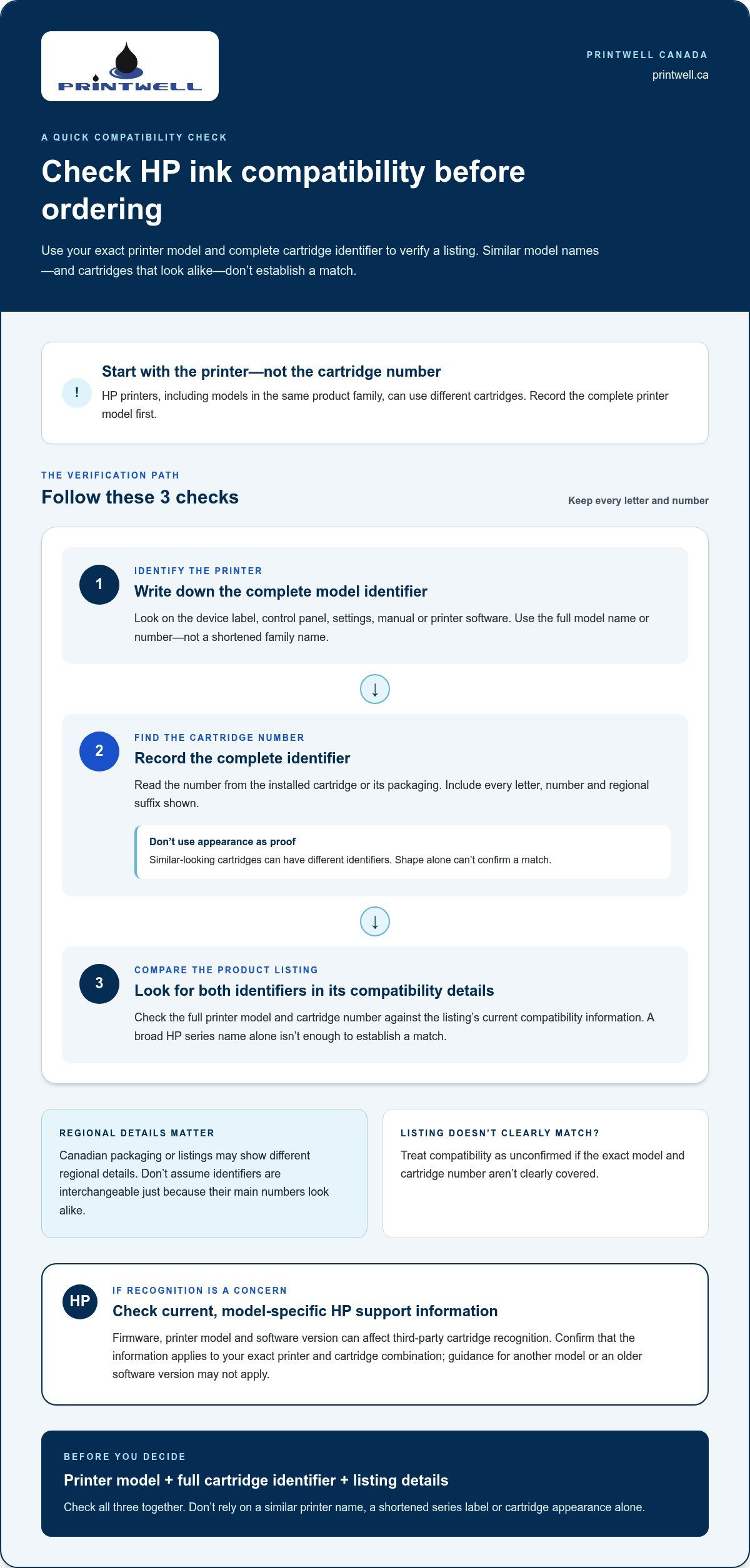
Start with the printer’s full model name or number. Find it on the device label, control panel, settings, manual or printer software. If a cartridge is installed, look for its identifier on the cartridge itself or its packaging. Record every letter and number. Similar-looking cartridges can have different identifiers, so appearance alone isn’t a reliable way to confirm a match.
Check product labels, regional details and firmware notes
Compare the complete printer model and cartridge identifier with the product’s compatibility list. Include all letters, numbers and regional suffixes. Canadian packaging or listings may use different regional details, so don’t assume two identifiers are interchangeable just because their main numbers look alike. If the listing doesn’t clearly match your model and cartridge number, don’t treat the compatibility as established.
Use this three-part check before you buy:
- 1. Identify the printer. Write down the complete model identifier from the device, settings, manual or printer software.
- 2. Find the cartridge number. Read it from the existing cartridge or its packaging, including any suffixes.
- 3. Compare the listing. Look for both identifiers in the product’s compatibility details, not just a broad HP series name.
For software-related recognition questions, consult current HP support information for your exact printer and cartridge combination. Firmware, printer model and software version can affect recognition, so don’t assume the same guidance applies to every HP printer. Check that the information is current and relevant to your model, since an older discussion may describe a different software version. Consumer Law Group provides background on consumer rights in Canada and discusses third-party cartridge issues. That legal resource isn’t a compatibility lookup, so use model-specific product and HP information to check the fit.
If you’re considering reusing your existing cartridge, Printwell Canada’s ink and toner refill service is another option for home or business printing in Ottawa.
Compatible HP ink cartridges vs. refills: compare the right option
A new cartridge and a refill solve the same immediate problem in different ways. The right option depends on your printer, the condition of your existing cartridge and what you print, not just the wording on a product listing. Use this comparison to weigh your options for compatible ink for HP printers Canada.
| Option | What you receive | Compatibility check | May suit you if |
|---|---|---|---|
| Original HP cartridge | A new HP-branded cartridge. | Match its cartridge number to the exact printer model. | You prefer an HP-branded replacement and have verified the model match. |
| New compatible cartridge | A new cartridge made by a third party and labelled for specified printers. | Compare the full cartridge number and printer model with the product’s compatibility list; review return terms. | You want a new cartridge and have found a listing that names your exact printer. |
| Professional refill | Ink replenished in an existing cartridge, rather than a new compatible unit. | Consider whether the existing cartridge is suitable to refill and intended for your printer. | You want to reuse your current cartridge, subject to its condition and refill suitability. |
When a compatible cartridge may suit your printing needs
A compatible cartridge may be a practical replacement if you want a new unit labelled for your exact printer. Before purchasing, match the complete cartridge number and printer model, read the product description and understand the seller’s return terms. A compatibility label identifies the intended models, but it doesn’t promise a particular page yield, colour or print quality. Compare the stated product details with the work you do, from everyday documents to colour pages.
When refilling an existing cartridge may be worth considering
Refilling keeps the existing cartridge in use and replenishes its ink. It differs from buying a newly manufactured compatible cartridge, and the cartridge’s condition is part of the decision. Printwell Canada offers ink and toner refills for residential and business customers in Ottawa. For a closer look at the process, read the printer ink refill guide.
Results can vary with the printer model, cartridge condition, document type and verified product details. For example, you might assess a cartridge used mainly for text documents differently from one used for colour-heavy pages. Consider your expected use and the fit, then choose the option that best aligns with your printing routine.
Takeaway: Compare expected use and verified fit, not the word “compatible” alone.
A practical checklist for choosing compatible ink in Canada
A clear listing makes it easier to compare compatible ink for HP printers Canada without relying on a low price or bold claims alone. Work through this checklist and weigh the product details against the way you print.
- Match the printer model. Check that the listing names your complete HP model, not only a broad printer family.
- Match the cartridge number. Compare the full identifier on your current cartridge or packaging, including letters and suffixes.
- Read the product description. Confirm whether you’re looking at a new compatible cartridge, an original cartridge or a refill, and note the stated compatibility details.
- Review seller policies. Read the return terms and any information about cartridge recognition or product support before ordering.
- Compare page yield fairly. Review yield figures only when the products use the same measurement basis and comparable testing conditions.
- Consider your print routine. Think about how often you print, whether you use colour and how important the documents are.
Read compatibility and yield claims carefully
A product page should give you enough detail to compare the exact printer model and cartridge number with its compatibility information. Broad phrases such as “fits HP printers” don’t establish a match. Treat yield as a point of comparison, not a promise. Figures measured under different conditions may not show which cartridge will last longer for your documents. A low price, high yield or broad compatibility claim doesn’t prove value on its own.
Match the ink option to your printing habits
Your typical jobs help set sensible priorities. If you print text occasionally at home, a clear model match and dependable document output may matter most. Frequent colour graphics may make colour performance and consistent results more important. For business printing, consider the documents you produce and how disruptive an unexpected cartridge issue would be.
Track your actual use rather than relying on a generic household estimate. Note how often you replace a cartridge and whether you mostly print text, graphics or a mix. This gives you a more useful basis for comparing stated yield and deciding whether a new cartridge or a refill better suits your routine.
For an Ottawa refill option, Explore Printwell’s ink and toner refill services for residential and business printing needs.
Choose an HP ink solution with confidence in Ottawa
Make an ink decision in this order: identify the printer, verify the cartridge, then compare buying a new cartridge with refilling one you already have. This helps you choose compatible ink for HP printers Canada based on a verified match and your actual printing needs, rather than a product label alone.
A simple decision path for home and business printers
For a new compatible cartridge, match the complete HP printer model and cartridge identifier with the product’s current compatibility details. Read the listing carefully, including its description and return terms. Don’t choose based only on a similar-looking cartridge or a broad reference to an HP printer family.
If your existing cartridge is in suitable condition, a refill may be another option. It reuses that cartridge instead of providing a new compatible unit. Consider your printing routine, too. Occasional home documents, regular colour graphics and recurring business jobs can call for different priorities.
For business printing, consider recurring print volume, colour requirements and how you plan your supplies so everyday work can continue smoothly. Tracking cartridge use and the types of documents you print can help you make a more informed choice over time.
Find local ink and toner refill support in Ottawa
Printwell Canada is an Ottawa-based printing business offering ink and toner refills for residential and business customers. If reusing an existing cartridge suits your situation, this local service offers an alternative to purchasing a new cartridge. Printwell Canada’s showroom is at St. Laurent Shopping Centre, giving Ottawa customers a local point of service for everyday printing needs.
There isn’t one right choice for every printer or print routine. Confirm the model and cartridge details first, then weigh a new cartridge against a refill based on your workload and the condition of the cartridge you have. This makes the decision clearer for home printing and business use alike.
For a local refill option, explore Printwell’s ink and toner refill services.
Make your next HP ink choice with confidence
A dependable choice starts with the details: identify your exact HP printer model, match the full cartridge number and read the product information carefully. The term compatible ink for HP printers Canada doesn’t mean a cartridge suits every HP printer, and a new cartridge isn’t the only option. Comparing a new compatible cartridge with a refill of your existing one can help you choose based on your printer, print habits and cartridge condition.
For Ottawa residents and businesses, Printwell Canada offers ink and toner refills, with a showroom at St. Laurent Shopping Centre. If reusing an existing cartridge fits your needs, it’s a practical local option for everyday printing.
Ready to explore a refill option? Explore Printwell’s ink and toner refill services for home or business printing. With the model and cartridge details in hand, you can take your next step with greater clarity and confidence.
Frequently Asked Questions
Is compatible ink safe to use in an HP printer?
Compatible ink may suit an HP printer when the cartridge is intended for that exact model and is in good condition, but results aren’t guaranteed for every product. Compatibility and print quality are separate considerations: a cartridge may be labelled for a printer without delivering the output you expect. Check its full identifier and current HP guidance. If the printer reports a problem or the cartridge appears damaged, stop using it.
Can any compatible ink cartridge work in every HP printer?
No. Cartridges are made for specific printer models and identifiers, so a product labelled for one HP printer may not fit another. Match your complete printer model and cartridge number against the product’s compatibility information rather than relying on appearance or HP brand wording. Regional variants and software details may also matter. Verify current information for your exact printer before purchasing, especially if the listing describes compatibility only in broad terms.
How do I find the right cartridge number for my HP printer?
Check the printer label, manual, printer software or an existing cartridge to find the relevant details. The printer model and cartridge number are separate identifiers, and you’ll need both to check a product match. Record the complete cartridge number, including letters and any suffixes, then compare it with the compatible product listing. Don’t select a cartridge based only on a similar shape or a shortened printer-family name.
Can an HP firmware update affect compatible ink cartridges?
It can, but cartridge recognition depends on factors such as the printer model, firmware and cartridge design, so an update won’t necessarily block every compatible cartridge. Check current HP support information and product-specific notes for your exact printer before updating or buying. Pay attention to the date and software version of any guidance you read. A recognition message is a reason to investigate, not proof that all compatible cartridges are unsuitable.
What should I compare when choosing compatible ink for an HP printer?
Compare the exact printer model, full cartridge number, product details, stated page yield and seller policies. Yield figures are useful only when their measurement basis and testing conditions are comparable. Consider whether you mostly print text, colour graphics or occasional documents, since your typical jobs shape what matters most. A low price or broad compatibility claim alone doesn’t establish value. Check the details together before choosing compatible ink for HP printers Canada.
Is refilling an HP cartridge different from buying compatible ink?
Yes. A compatible cartridge is a newly supplied third-party cartridge designed for specified printer models; a refill puts ink into an existing cartridge. Which option suits you depends on the cartridge’s condition, printer compatibility and your printing needs. In Ottawa, Printwell Canada offers ink and toner refills for residential and business customers. Its showroom is at St. Laurent Shopping Centre, providing a local option for customers considering a refill.