 A Proud Canadian Company
The lowest-priced cartridge isn’t always the most affordable toner for Brother printers once you account for how many pages it can print. Compare the cartridge price with its stated yield, then consider whether a compatible cartridge, remanufactured toner, or multipack suits your printer and printing habits.
It’s easy to focus on the online price, especially when you need a replacement quickly. But the cartridge code, page yield, and checkout details all affect value. This guide explains how to estimate cost per page, compare cartridge options in Canada, and choose the right match for your printer. You’ll also learn when a multipack makes sense and what to check before ordering.
Key Takeaways
- Match the cartridge code to your Brother printer, then weigh the differences between compatible and remanufactured toner before choosing.
- A TN223 multipack contains four cartridges: black, cyan, magenta, and yellow. That format can suit colour printing when you need the full set.
- When shopping online, compare the complete order details and cartridge yield, not just the price shown beside the product.
- Estimate cost per page by dividing the cartridge price by its stated page yield, and remember that your print coverage affects how long toner lasts.
- Understand what to consider about third-party toner and warranty coverage, then explore Ink & Toner Refills from Printwell Canada as a practical next step.
Compatible and remanufactured Brother cartridges
Compatible cartridges are made by third parties for Brother printers. Remanufactured cartridges are reused cartridges that have been cleaned and refilled. Both are alternatives to Brother-branded toner, but the printer’s cartridge code and your print needs should guide your choice.
Matching cartridges to printer models
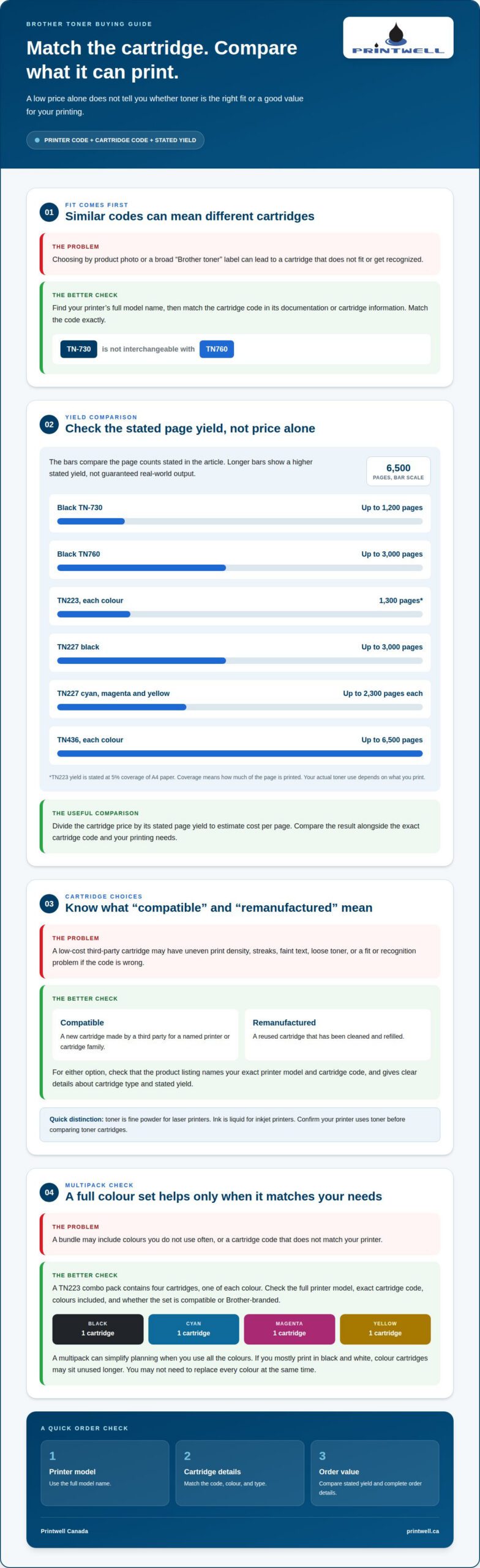
Start with the printer’s full model name, then find the cartridge code listed for it in the printer’s documentation or cartridge information. Match that code exactly before choosing a compatible or remanufactured option. Similar-looking codes can refer to different cartridges, so don’t rely on appearance alone. For example, TN-730 and TN760 are distinct Brother toner models, not interchangeable names.
Keep your printer model and cartridge code together when comparing options. This helps narrow the choices without relying on a product photo or a broad “Brother toner” label.
Brother cartridge model categories
Brother toner codes identify different cartridge families and yields. For example, black TN-730 toner has a stated yield of up to 1,200 pages, while black TN760 toner yields up to 3,000 pages. In colour families, each TN223 cartridge yields 1,300 pages at 5% coverage of A4 paper. TN227 black yields up to 3,000 pages, while its cyan, magenta, and yellow cartridges each yield up to 2,300 pages.
TN436 cartridges are another option: black, cyan, magenta, and yellow each have a stated yield of up to 6,500 pages. These figures help identify the cartridge category, but actual use depends on what you print. Check the code and colour before selecting a replacement.
Risks of cheap compatible toner
Low-cost compatible toner can produce uneven print density, streaks, faint text, or loose toner on the page. A cartridge may also fail to fit or be recognized if it doesn’t match the printer’s required code.
For text-heavy documents, inconsistent black coverage can make pages harder to read. Colour printouts may show uneven tones if cyan, magenta, or yellow toner doesn’t transfer consistently. Check that the listing names your exact Brother printer model and cartridge code, and provides clear details about cartridge type and stated yield.
To find affordable toner for Brother printers, compare cartridge type, stated yield, and fit. A lower purchase price alone doesn’t show whether a cartridge suits your printing. A remanufactured cartridge may appeal if you prefer a reused option, while a compatible cartridge is a new third-party alternative. The right choice depends on the exact printer code and the documents you print most.
Toner and ink cartridges serve different printer types. Toner is a fine powder used in laser printers, while ink is liquid used in inkjet printers. Brother laser printers use toner cartridges, such as the TN-730 or TN223; an ink cartridge won’t replace them. Confirm that your printer uses toner before comparing cartridge options.
Brother printers can also arrive with toner already in the box. The HL-L2405W includes 700 prints, and the MFC-L2807DW includes 1,200 prints. Once that supply runs low, use the printer’s full model name and the matching cartridge code to narrow your replacement choices. Then compare compatible and remanufactured options based on fit, yield, and the kind of printing you do.
Compatible toner multipacks
A compatible multipack groups third-party toner cartridges into one purchase. Brother’s TN223 combo pack contains four cartridges: black, cyan, magenta, and yellow.
Compatible toner bundle options
A four-cartridge bundle can be useful when a Brother colour printer needs several toner colours. The TN223 combo pack includes one cartridge for each colour: black, cyan, magenta, and yellow. That gives you a full colour set rather than a single replacement.
Before choosing a bundle, consider which colours you use most. Regular colour documents may use all four, while mostly black-and-white printing may leave colour cartridges unused for longer. A multipack can simplify replacement planning, but its value depends on whether your printer can use every cartridge in the set.
Read the bundle description closely. Confirm the cartridge codes, colours included, and whether the set is compatible or Brother-branded. “Compatible” means a third-party cartridge made for a named printer or cartridge family. A bundle title alone may not reveal whether it contains the right combination for your needs.
Checking printer model compatibility
Start with the full Brother printer model, then match it to the cartridge code named in the multipack details. For example, a TN223 bundle should only be considered for a printer listed as compatible with TN223 cartridges. Similar model names or a shared brand name don’t prove that cartridges will fit.
Use your printer’s documentation or cartridge information to identify the required code. Compare it with each listing, including the colour and cartridge type. If a product page names several Brother models, make sure your exact model is included instead of relying on a general reference to Brother printers.
A multipack also changes how you plan replacements. With four TN223 cartridges, you receive one cartridge for each colour, but you may not need to replace them together. If black toner runs out first, the other colours can remain in reserve. Keep the unused cartridges grouped by colour and code, so the next replacement is easy to identify.
Consider storage and timing before buying a full set. A multipack bought well before you need a replacement takes up space, and some cartridges may sit unused. Match the bundle to your printer’s cartridge family and expected printing pattern. For example, a household that prints colour pages occasionally may not need extra colour toner sitting in storage.
Compare bundles by cartridge count, exact code, and the contents of the set, not by the word “multipack” alone. A black-only bundle and a four-colour bundle serve different printing needs. For readers considering ink and toner refills, the cartridge code remains a useful starting point for identifying the toner required by a Brother printer.
Buying toner online
Online listings make it easy to compare Brother toner from home. Start with the exact cartridge code, then compare cartridge type, stated yield, and the full checkout details.
Search by your printer’s model or the cartridge code it uses. For example, searching “TN-730” narrows results more effectively than searching only “Brother toner.” A broad search can mix black toner, colour cartridges, and different cartridge families. Treat the product title as a starting point, not the final compatibility check.
Open each promising listing and read its full description. Look for the cartridge code, colour, and whether it’s Brother-branded, compatible, or remanufactured. A listing for TN760 black toner is different from a listing for TN-730 black toner. Similar-looking codes don’t mean the cartridges are interchangeable.
Next, compare the stated page yield. Yield means the manufacturer’s estimate of how many pages a cartridge can print under stated testing conditions. Brother lists the TN760 black cartridge for up to 3,000 pages, while the TN-730 is rated for up to 1,200 pages. Those figures help put listings in context, but actual use depends on the pages you print.
For colour printing, check every colour and code in a bundle. A TN223 combo pack contains four cartridges: black, cyan, magenta, and yellow. A bundle description should make its contents clear. Confirm that the listing names the required cartridge family, rather than assuming every Brother colour printer uses TN223.
Before ordering online, review the checkout summary. Compare the item, quantity, delivery charge, and any other charges shown before payment. The product price alone doesn’t show the full amount due. Keep your order confirmation, which records the cartridge code and quantity.
Use a simple comparison note for each listing: cartridge code, cartridge type, stated yield, quantity, and checkout total. For example, compare a TN760 listing with another TN760 listing, not with TN-730. That keeps the comparison focused on like-for-like options instead of making a lower displayed price seem automatically better.
Online descriptions can also help you spot a mismatch before ordering. If the title says TN436 but the details describe another code, don’t treat the title as enough. Match the model name and cartridge code across the product description and order summary. This small step can prevent ordering a cartridge that doesn’t match your Brother printer.
For a practical shortlist, keep only listings that identify the precise Brother cartridge code and colour. Then compare cartridge type, yield, and checkout total. This makes options easier to assess and helps distinguish a suitable replacement from a listing that merely mentions Brother.
Calculating cost per page
Cost per page helps you compare Brother toner beyond its purchase price. Divide the cartridge price by its stated page yield to estimate toner cost per page under the stated yield conditions. Use the same calculation for each option, and compare black and colour toner separately.
This example shows why a higher-priced cartridge may still have a lower estimated cost per page if its stated yield is higher.
Brother states that toner cartridge yields are calculated in accordance with ISO/IEC 19752 for Letter/A4 paper. ISO/IEC 19752 is the standard used for this toner-yield testing. A yield is a test-based estimate, not a guarantee of the number of pages you’ll print. Your documents may use toner differently from the test conditions, so treat the calculation as a comparison tool.
Compare black cartridges within the same printer family. The Brother TN-730 has a stated yield of up to 1,200 pages, while the TN760 has a stated yield of up to 3,000 pages. Divide each cartridge’s price by its own yield. Comparing those results gives a clearer view than comparing purchase prices alone.
Colour toner needs a separate calculation for each cartridge. Each Brother TN223 cartridge has a stated yield of 1,300 pages at 5% coverage of A4 paper. The TN227 black cartridge yields up to 3,000 pages, while its cyan, magenta, and yellow cartridges each yield up to 2,300 pages. Don’t treat a colour set as one cartridge.
The Brother TN436 black, cyan, magenta, and yellow cartridges are each stated to yield up to 6,500 pages. To compare a colour set, calculate each colour’s price per page using its own yield. Then consider how often your printing uses each colour. A large stated yield doesn’t mean every cartridge will run out at the same time.
Coverage matters. The TN223 yield uses 5% coverage of A4 paper, meaning toner covers a portion of the page under the stated test conditions. A page with dense text, graphics, or large filled areas can use more toner than a lightly printed page. Your real page count may therefore differ from the estimate.
For a practical comparison, write down each cartridge’s price, stated yield, and cost per page. Keep the model and colour beside each result, such as TN-730 black or TN223 cyan. This simple method helps you compare like with like and choose toner based on both the upfront amount and expected printing volume.
Do third-party toners affect Brother warranties in Canada?
A third-party toner cartridge alone doesn’t establish what caused a printer fault. The key distinction is between using a non-Brother cartridge and damage linked to that cartridge. For example, poor print quality and a printer error are different symptoms, and each needs its own assessment.
Keep the cartridge packaging and purchase record if your Brother printer develops a problem. Note the cartridge code, when you installed it, and what happened afterward. These details create a useful timeline. A streaked page after a cartridge change, for example, offers different clues from a printer that won’t power on.
Separate print-quality concerns from printer damage. Faint text, uneven colour, or streaks may point to how toner transfers onto paper. Toner spilled inside the printer is a different issue. Describe the exact symptom rather than assuming every fault comes from the cartridge or printer.
If an error appears, record its wording before changing anything. Avoid discarding the cartridge or packaging while the issue remains unresolved. This preserves details such as the cartridge code and product description, including whether the cartridge was described as compatible or remanufactured.
Warranty terms and the cause of a specific fault are separate considerations. Read the terms supplied with your Brother printer, focusing on the coverage and how a repair is assessed. Don’t treat the cartridge brand alone as proof that coverage applies or does not apply. The cause of the reported problem matters.
A clear troubleshooting account can include:
- The full Brother printer model and the cartridge code installed.
- The date the cartridge was changed and the first sign of trouble.
- The exact error message, print defect, or unusual toner residue.
- Whether the same problem continues after the cartridge is removed.
Describe what happened without claiming a cause. A page with faint black text, for instance, is a concrete symptom. “The toner ruined the printer” is a conclusion, not an observation. Keeping these descriptions distinct makes a support conversation more precise.
When comparing third-party toner, weigh cartridge choice against your support needs. A compatible cartridge is made by another manufacturer; a remanufactured cartridge has been cleaned and refilled for reuse. Keep the product description and purchase details so you can identify the cartridge if a printer issue arises.
For a Brother warranty concern in Canada, focus on the printer model, written warranty terms, and evidence about the specific fault. A third-party cartridge’s presence is one detail, not a diagnosis. Clear notes, original packaging, and a precise description help keep the discussion grounded in what the printer actually did.
Printwell Canada: Ink & Toner Refills
Printwell Canada offers Ink & Toner Refills for customers looking to replenish printer supplies. After comparing Brother cartridge codes, yields, and cost per page, a refill may suit your printing needs. Have your printer model and cartridge information ready to describe what you use. The right choice depends on your printer and how you print, whether you mainly produce text documents or regularly use colour. Printwell Canada also offers custom printing, including Custom T-Shirts, DTF Stickers and Films, and Embroidered Hoodies. Contact Printwell Canada to discuss your printing needs.
Make your next printing decision with confidence
Build a simple replacement plan around the work you print most. Note your Brother printer model and preferred cartridge type, then review the plan when supplies run low. This makes your next purchase more deliberate, whether you want to minimize interruptions, choose a refill, or compare the longer-term value of affordable toner for Brother printers.
Printwell Canada also offers Custom T-Shirts, DTF Stickers and Films, and Embroidered Hoodies for projects beyond everyday printer supplies. If you’d like to discuss Ink & Toner Refills or another printing need, contact Printwell Canada. A clear idea of what you need is a good place to begin, and the next step can be straightforward.
Frequently Asked Questions
Which Brother printer models use the same toner cartridges?
Brother printers use the same toner when their documentation specifies the same cartridge code. Don’t assume models from the same series share cartridges, or that similar codes are interchangeable. For example, TN-730 and TN760 identify different toner models. Check the full printer model and cartridge code together, including the colour for a colour printer. This is especially useful when replacing toner in multiple Brother printers at home or work.
What are the cheapest compatible toner cartridges for Brother printers in Canada?
The lowest-cost compatible option depends on your printer’s cartridge code, colour needs, and the cartridge’s stated yield. Compare matching cartridges, not unrelated models, and consider the checkout total alongside the stated page yield. A multipack may suit a printer that uses several colours, while a single black cartridge may fit text-heavy printing. No compatible cartridge is cheapest for every Brother printer.
How do genuine, remanufactured, and compatible Brother toner compare in price and quality?
Genuine toner is made by Brother, compatible toner by another manufacturer, and remanufactured toner uses a cleaned and refilled cartridge. Prices and print results vary by cartridge and listing, so compare the same cartridge code and stated yield. For a colour printer used for client documents, consistent colour may matter more than the lowest price. Your priorities may differ for routine drafts.
How can I find the correct toner cartridge for my Brother printer model?
Find your Brother printer’s full model name in its documentation or printer information, then identify its cartridge code. Match the code in the product description, not just the word “Brother” or a similar-looking model name. For colour printers, confirm the required colour too. If you have several printers, note each model beside its cartridge code to avoid mixing up replacement orders.