 A Proud Canadian Company
A business card can be eye-catching and still miss its mark if people can’t quickly read or use it. When designing effective business cards 2026, start with clarity: choose the right details, create an easy-to-follow layout and prepare artwork that reproduces well in print. A distinctive look can make the card memorable, but it shouldn’t get in the way of a useful connection.
It’s easy to wonder what deserves a place on a small card or whether a design that looks polished on screen will work on paper. These choices matter. Small type, crowded layouts and overlooked print setup details can make a card harder to use.
This practical guide covers how to choose essential contact and brand information, build a visual hierarchy for your business and audience, and prepare your artwork for printing. You’ll also learn what to check in a proof before approving the final card. With a clear plan, you can create a professional, memorable card that supports a consistent business identity and makes it easy to stay in touch.
Key Takeaways
- Start with one clear purpose so your card feels useful, recognizable and true to your business.
- Use contrast, spacing and thoughtful type choices to make the most important information easy to find.
- When designing effective business cards 2026, choose a layout that fits how and where you’ll share it, rather than following a trend alone.
- Follow the print specifications for your artwork and review the proof carefully before approving it.
- Carry your logo, colours and typography across business materials to build a more consistent brand identity.
Designing Effective Business Cards Starts With One Clear Purpose
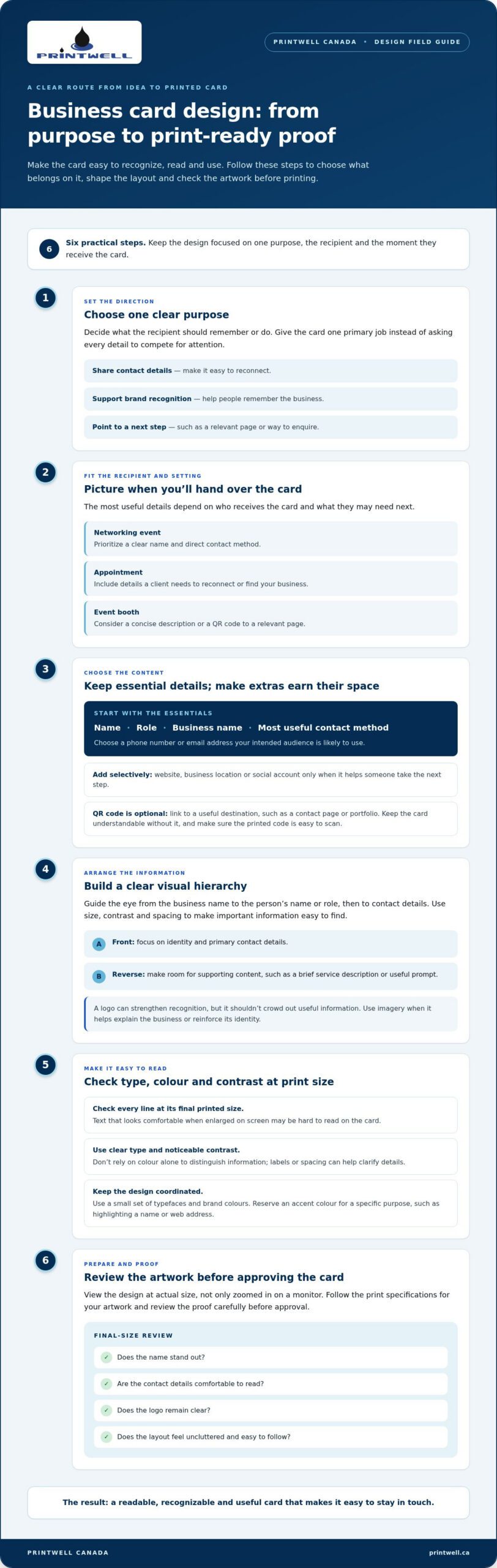
You don’t need complicated graphics or a long list of details to make a strong first impression. Designing effective business cards 2026 starts with clear choices: who the card is for, what they should remember and how they can follow up. An effective card is readable, recognizable, useful and consistent with the business it represents.
Picture the moment you’ll hand over the card. At a networking event, a clear name and direct contact method may matter most. For appointments, include the details a client needs to reconnect or find your business. At an event booth, a concise description or QR code leading to a relevant page can give someone a useful next step. For background on the medium, see Wikipedia’s overview of standard business card practices.
What should a business card accomplish?
Choose one primary goal before arranging the design. Is the card mainly for sharing your contact details, helping people remember your brand or guiding them to a specific next step? Then consider the recipient and setting. A prospective client may need a direct way to book or enquire, while a retail customer may want a website where they can learn more.
A focused card gives the main action room to stand out. If every detail competes for attention, the recipient may not know what to do next. Include supporting information only when it helps the card serve its purpose.
Which information belongs on a business card?
Start with the essentials: your name, role, business name and the most useful way to reach you. Choose a contact method your intended audience is likely to use, such as a phone number or email address. Add a website, business location or social account only if it helps someone take the next step. Extra details can crowd a small layout without adding value.
A QR code is optional, not a requirement. If you include one, link to a specific, useful destination, such as a contact page or portfolio, and make sure the printed code is easy to scan. The card should still make sense without it. Keep the purpose clear, the information relevant and the route to reconnect simple.
Build a Readable Business Card With Strong Visual Hierarchy
Once you know what the card needs to do, arrange its information so someone can find the important details at a glance. Visual hierarchy is the order in which the eye notices elements. Size, contrast and spacing can guide the reader from the business name to a person’s role and then to contact details, without making them work to find the information.
Give key information breathing room. A name set clearly apart from smaller contact details is easier to scan than several elements competing at the same size. Limit the design to a small, coordinated set of typefaces and brand colours. Use decorative elements only when they reinforce recognition. Advice on designing for a great first impression also highlights the value of a deliberate, professional presentation.
Choose typography and colour for legibility
Check every line at the card’s final printed size, especially compact contact details. Text that looks comfortable when enlarged on a screen may be difficult to read in print. Use clear type, create noticeable contrast between text and background, and don’t rely on colour alone to distinguish information. Labels or spacing, for example, can clarify details even when a colour difference is subtle.
Keep brand colours consistent across the card, then reserve an accent colour for a specific purpose, such as drawing attention to a name or web address. Too many colours or type styles can weaken the visual order instead of making the design more distinctive.
Make layout and imagery work together
Place the business name and the cardholder’s name or role where they’re easy to find. A logo can strengthen recognition, but it shouldn’t crowd out the information people need. Choose imagery only when it helps explain the business or reinforce its identity. A decorative graphic that competes with the text takes space away from useful details.
The front and reverse can share the work. Keep the front focused on identity and primary contact details, then use the reverse for supporting content, such as a brief service description or a useful prompt. This creates room for a cleaner layout without shrinking type to fit everything on one side.
Before finalizing the design, view it at actual size, not just zoomed in on a monitor. Check whether the name stands out, the details are comfortable to read and the logo remains clear. This review can catch crowded spacing or weak contrast before the artwork goes to print. When your file is ready, business card printing can turn that considered layout into a physical brand touchpoint.
Choose Business Card Design Details That Fit Your Brand and Use
A card should suit the way your business meets people, not simply follow the latest design trend. A consultant handing out cards after a conversation may need a restrained layout and a clear contact route. A retailer might feature its brand and store details, while an event exhibitor could use a brief service description or a QR code linked to a relevant page. Designing effective business cards 2026 means matching the design choices to the recipient and the moment.
Consider three broad approaches:
- Minimal: Prioritizes brand recognition and a short set of essential details. It works well when one clear contact route is enough.
- Information-rich: Includes additional details that help recipients understand the business or follow up, provided the layout remains easy to scan.
- Visually expressive: Uses distinctive colour, imagery or graphic elements to reflect a creative brand or help an event card stand out, while keeping key information legible.
The right balance depends on what the recipient needs. A service business might make its core offering easy to identify. A consultant may give their name, role and direct contact method prominence. A retailer might include a store location or website, while an event exhibitor could make a portfolio or product page easy to reach after the show.
When should a business card stay minimal?
Choose a minimal layout when recognition and a simple follow-up route matter most. Generous spacing helps a short list of details feel organized and gives the business name or logo room to register. But minimal shouldn’t mean incomplete. Keep the information recipients need to identify you and reconnect. Removing a useful email address or other key detail can make a clean design less effective.
When do QR codes, colour, or the reverse side help?
A QR code earns its space when it leads to a useful next step, such as a portfolio, booking page or contact information. Make it large and clear enough to scan, use strong contrast against its background, and leave room around it. Don’t add a code simply because it feels current. The card should still be useful if someone doesn’t scan it.
Colour can reinforce brand character or distinguish a key element, while the reverse side can hold supporting information without squeezing the front. Use it for a concise service summary, location or digital destination rather than repeating the same details twice.
Stock and finish also affect how a card looks and feels in someone’s hand. Choose them to support the intended impression and practical use, but don’t let texture or visual effects compromise readable text. The design should feel like a natural extension of your brand, whether it’s understated, information-led or more expressive.
Prepare and Proof Your Business Card Design Before Printing
A polished layout still needs careful file preparation. Before ordering, follow a short preflight: confirm every detail, check the artwork against the print specifications, then review the proof before approving production. This final pass is a practical part of designing effective business cards 2026 and can catch avoidable errors before they appear on a printed card.
Check content, artwork, and file setup
Proofread names, titles, phone numbers, email addresses and web addresses character by character. A single misplaced letter or digit can make it harder for someone to reach you. Check both sides of the card, including small text and the destination of any QR code.
Next, compare your artwork with the specifications for the print job. Confirm the finished dimensions, bleed, safe area, image resolution and accepted file format. Bleed lets background artwork extend beyond the trim edge, while the safe area keeps important text and logos away from that edge. Follow the supplied measurements instead of relying on a template from another print job.
Use the colour settings requested for the artwork, and remember that colours displayed on screen can look different in print. Screens and printed materials use different colour processes, so don’t assume an exact match. Check the supplied file carefully and make sure fonts, images and other design elements appear as intended before reviewing the proof.
Review the proof at actual size
Look at the proof at the card’s real dimensions. Check spelling, alignment, contrast, image quality and overall balance. Make sure no text or logo sits too close to the trim edge, and confirm the front and reverse read as a coherent pair. If you’re viewing the proof on screen, use it to inspect layout and content, but remember it may not represent printed colour exactly.
If your design includes a QR code, scan it with a phone and verify that it opens the intended destination. Test the printed proof when possible. A code that works on an enlarged screen preview may be less convenient to scan at its final size.
For local customers, Printwell’s Ottawa showroom at St. Laurent Shopping Centre offers an in-person option. Preparing and reviewing your artwork carefully makes the transition from digital file to printed card more assured. Explore business card printing with Printwell.
Turn Your 2026 Business Card Design Into a Useful Brand Touchpoint
A business card does more than pass along contact details. It gives someone a small, tangible reminder of your business after a conversation, appointment or event. Before you send artwork to print, use a simple final test: does the card have a clear purpose, essential information, a readable hierarchy and carefully checked artwork? If so, it’s ready to support a real connection.
Keep business cards consistent with the rest of your brand
Use the same logo, brand colours and typography found on your other business materials. Visual consistency helps people recognize your business across a card, sign or other printed piece, without making every item identical. For more help planning print materials, explore this professional printing guide for Canadian businesses.
Promotional products can extend a coordinated look at an event or in a client welcome package. Custom apparel, mugs or other branded items can carry the same visual identity beyond the card. If you’re considering a broader set of materials, see the guide to custom promotional products in Canada.
Choose a straightforward next step
Once the artwork is final and proofed, choose business card printing. Printwell Canada offers online ordering and shipping across Canada. Ottawa customers can also visit the showroom at St. Laurent Shopping Centre. Your finished card can then become one practical part of a consistent identity, ready to share wherever you meet clients and colleagues.
Designing effective business cards 2026 doesn’t require a complicated process. Make the purpose clear, keep the brand recognizable and prepare the artwork carefully. When you’re ready to move from finished file to printed cards, explore business card printing at Printwell Canada.
Make Your Next Business Card Count
A strong business card doesn’t need to be complicated. Give it a clear purpose, make the most useful details easy to find, and choose design choices that feel true to your brand. Before printing, check the artwork and proof carefully so a polished screen design also works as a physical card.
That’s the practical approach to designing effective business cards 2026: create a card people can recognize, read and use to reconnect. Keep your logo, colours and typography aligned with your other business materials, and your card can become a thoughtful part of a consistent brand identity.
Printwell offers business cards as part of its custom printing services. Order online with nationwide shipping, or visit the Ottawa showroom at St. Laurent Shopping Centre. When your artwork is ready, explore business card printing at Printwell Canada.
With a clear design and careful preparation, you’re ready to make a confident introduction, one card at a time.
Frequently Asked Questions
What information should I include on a business card in 2026?
Include your name, role, business name and the best way to contact you. Add a website, location or social account only if it helps the people who’ll receive the card. A QR code can link to a useful page, such as your portfolio or contact details, but it shouldn’t replace essential information. Keep the content focused so recipients can identify you quickly and know how to follow up.
What is the standard business card size in Canada?
A common Canadian and North American business card size is 3.5 by 2 inches, or about 89 by 51 millimetres. Printers may use different formats, so follow the dimensions supplied for your print job rather than assuming every card uses the same size. Include the specified bleed and keep text and logos within the safe area to prevent important content from being trimmed.
How do I design a business card that looks professional?
Designing effective business cards 2026 starts with a clear purpose and a layout people can scan easily. Give your name and business identity visual prominence, then make contact details readable at the final printed size. Use a consistent logo and brand colours, limit competing typefaces and decorative elements, and leave enough space around key information. Review the design at actual size before preparing the print file.
Are QR codes still useful on business cards?
Yes, a QR code can be useful if it leads to a relevant next step, such as a portfolio, booking page or contact information. Make sure it has clear contrast, enough space around it and a scannable size in the printed design. Test it with a phone before approving the artwork. Keep essential contact details on the card too, so people can connect without scanning the code.
Can I design my own business cards and send the file to print?
Yes, you can prepare your own business card artwork and send it for printing. Set up the file to the print job’s specifications, including dimensions, bleed, safe area, resolution and file format. Before production, check the proof for spelling, contact details, alignment and image quality. Printwell Canada offers business card printing, with online ordering and an Ottawa showroom at St. Laurent Shopping Centre.
How do I prepare a business card file for printing?
Start by proofreading every name, title, phone number, email address and web address. Then set up the artwork using the printer’s required dimensions, bleed, safe area, resolution and file format. Use the requested colour settings, and remember that screen colours may differ from printed results. Review the proof at actual size for text, alignment, contrast and image quality, and scan any QR code to test its destination.
How much do business cards cost in Canada?
Business card costs in Canada depend on the order details, including quantity and print specifications. The total can vary with the choices made for a particular job, so there isn’t one reliable price that applies to every card order. Printwell Canada offers business card printing, with online ordering and nationwide shipping. Ottawa customers can also visit the showroom at St. Laurent Shopping Centre.